Category: Lighting & Work Setup

  • How Physical Boundaries Transform Desktop Organization and Reduce Visual Noise

    Most desks don’t stay as neat as they look after a reset. By 11:30am, a setup that started out “clear” can feel crowded again—just from unplugging a laptop, dragging a cable over your keyboard, or shifting a notebook into a strip of empty space. The difference between a streamlined workstation and an energy-draining one isn’t a single pile of cables or pens—it’s how small interruptions multiply every hour: cords nudging forward, charging blocks blocking reach, a drawer unit forcing you to readjust your leg at every sit-down. Visual order doesn’t always mean practical flow. That friction costs time and focus, especially when you’re switching tasks or moving fast.

    Why Tidy-Looking Desks Still Interrupt Your Workflow

    Smart organizers, cable trays, or desk bins might promise a permanent solution, but repeated use exposes the gap between display tidiness and real-world ease. If cable trays run through your main reach zone, or organizers sit right where you drop your hand, the “cleared” surface becomes an obstacle course all over again. A visually minimal setup can still force you to nudge a cable aside every time you move the mouse or bump an accessory while writing notes. Under-desk boxes hide the mess but add new annoyances—like digging for a charger and hitting your knee on the tray mid-task.

    Reset routines break down fast when:

    • Cables, even when clipped, keep sliding into your elbow space during device swaps.
    • Weighted cord clips hold the end in place, but the length still snakes across where you type or reach.
    • Open-topped organizers situated in your arm’s path collect clutter right where your hands need to land.
    • Adding a neatly mounted under-desk tray means you’re crouching to swap a cable—trading surface mess for access hassle.

    The desk reads “minimal,” but task after task, micro-frustrations surface and slow you down. A false sense of order becomes more distracting than scattered tools you can actually see and reach.

    Small Decisions That Shape the Work Day

    Long mornings test every desk setup. After just a few hours—sketching, juggling emails, jumping into a video call, scribbling a quick note—the good intentions from your 9:00am lineup are already worn thin. Is the charger always under the notebook, forcing you to reach across? Are cables hanging just low enough to catch your knee? Did your drawer unit that saved surface space now jam your chair, or make you lean awkwardly to access a needed adapter?

    These breakdowns show up not on a spreadsheet, but in real seconds spent every time you:

    • Plug in a device and realize the cable box blocks half your legroom and covers part of the power strip you need.
    • Drop your keys or mail in a “catch-all” tray, only to have it overflow by lunch, crowding out your notepad or phone.
    • Swing your chair out, discovering the cable loop now tangled around the seat base—turning every adjustment into a minor battle.

    The difference between a setup that’s fit for display and one that’s fit for actual work is what happens when you have to adapt mid-flow. Clean lines mean nothing if the minute you switch tools, the resistance returns.

    Drawing a Line: The Small Boundary That Changed Reset Routines

    The turning point wasn’t a full desk overhaul, but one boundary: every cable travels flat along the rear desk edge, not the working middle. Chargers, adapters, and extra plugs push just past your normal reach, kept beneath or behind a rigid tray or dock. Only rarely used items (old drives, a backup notebook) stay at the far side—accessible but never crossing the main action zone. The middle, where you write, type, and move, is cleared by default and resets automatically between cycles.

    Holding this line physically—about 7 centimeters from the desk’s back edge—did two things: daily drops (like a phone or closed notebook) landed with space to spare, and deliberate grabs for a charger or unusual accessory never left cords drifting across prime workflow. The difference was quiet but constant: fewer pauses to shift something aside, fewer interruptions to your hands, and a desk that actually stayed “reset-ready” even as you switched between keyboard, sketchpad, and screen all day.

    Daily Use: The Real Differences That Add Up

    • No more repeated clearing: After every task switch—writing, calling, sketching—the working zone is clear, not stuck in a perpetual mid-reset.
    • No cable creep: With the rear edge marked, cords can’t crawl forward; you stop nudging chargers out of your way just to open a notepad or adjust the mouse.
    • Instant access—without desktop overflow: A bin just past reach holds spares and rarely touched tools—far enough to prevent pile-up, close enough not to derail your routine.

    This isn’t about pristine perfection. It’s about killing the micro-friction—restoring flow and making quick resets a background reflex, not a new daily chore.

    FAQ: Pinpointing Real-World Desk Noise Friction

    How do I keep cables anchored without always adjusting them?

    Secure every cable along the very back edge using a tray, clip sleeve, or routed box. Open trays alone let cables wander back into view within days. It’s the fixed boundary—whether adhesive or physically rigid—that keeps the working zone clear and the cable paths out of reach.

    Will open-top organizers help or hurt my desk clarity?

    They work only when placed well outside your daily reach zone and reserved for items you seldom use. Put them close or make them a catch-all, and clutter piles up directly where you work—ruining your flow and your original plan.

    Why does visual noise seem to come back just hours after a tidy?

    Without a hard boundary, loose items and stray cables inch back into your main sightline and sweep zone each time you shift posture, move your chair, or switch tasks. Every unstructured cycle invites new spillover—each small interference quietly slowing your ability to focus or switch gears.

    Defending the Desk: Real Setup, Not Just Display

    Keeping visual noise in check is a constant fight with how your desk actually fills and empties—session after session. Lasting workstations don’t just look minimal; they keep core work zones free, cables pegged at the edge, and rarely-used items stored a little out of reach but always accessible. Less fatigue on a busy day comes not from a “styled” setup, but from friction-free resets that never build into a midday chore. Sometimes it’s a few centimeters of enforced boundary—between the keyboard and cables, or side bin and workspace—that turn a pleasant-looking desk into one you can actually rely on between task changes, call after call.

    Explore the full WorkBasic collection

  • Why Repositioning Indoor Lights Improves Safety and Daily Use

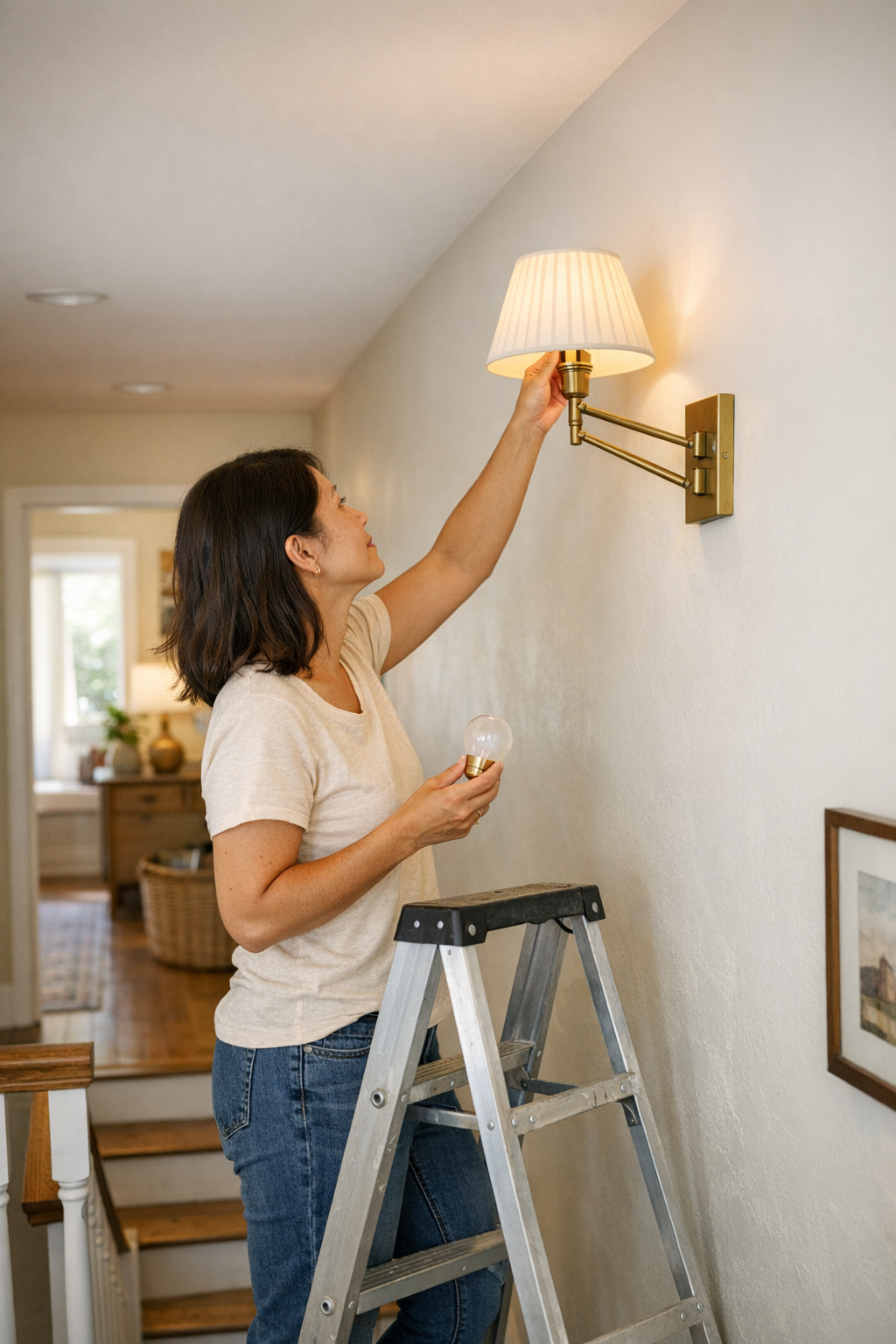
    The real test of indoor lighting isn’t how a fixture looks on installation day—it’s what happens every time you need to access it. If you’ve ever stood halfway up a stairwell, shifting your weight with one foot angled on a step, hand stretched for a flush mount ceiling fixture that always seems just out of reach, you’ve felt how access failures turn convenience into a hassle. The wrong location doesn’t just create a maintenance headache; it can be a silent safety risk, and a steady drag on how you use your own space. These are the decisions that don’t show up in showrooms—and they’re exactly where the payoff or penalty of your lighting choice reveals itself, one awkward reach or ignored dust patch at a time.

    When Good Light Meets Bad Access

    Standing below a stair landing, squinting upwards, you might notice the lighting feels balanced on paper—or in a listing photo. But routine use tells another story. Every time you stand on tiptoe, ladder wobbling, just to replace one stubborn bulb, spatial design clashes with daily reality. Fixture placement that forces you into weak footing or awkward stances is a structural inconvenience baked into your routine.

    You see this disconnect in nearly every room: a wall sconce over a laundry counter that glows perfectly until you need to reach over the washer—straining each time just to clean the glass—or a snug vanity light that serves the sink’s edge, but leaves your hand brushing a mirror when it’s time for upkeep. These aren’t dramatic flaws, but they quietly push routine tasks off your list or make you delay them until the shadow and dust become impossible to ignore. The problem is rarely brightness or coverage. It’s the subtle misfit between where the light is, and where your hands can safely reach.

    Structural Choices Shape Daily Movement

    Ceiling lights, wall sconces, and task fixtures all shape how you move through—and maintain—your space. Their mounting points aren’t just about balance or symmetry, but how your body interacts with the room, again and again. Centered flush mounts above a stair void or behind a door might look “right,” but demand awkward ladder setups or unsafe reaches. A semi-flush pendant meant to anchor a small hallway lands directly above a traffic pinch point—now every bulb change means dragging furniture or contorting around it. Repeated, these micro-mismatches chip away at any sense of lighting as support for actual living.

    Stairways: Where Access Meets Hesitation

    In staircases, visual balance often demands ceiling fixtures up high or at mid-landing turns. But when the first burnt-out bulb forces you up a ladder, torso twisted over the handrail, it’s clear the architect never hung the light themselves. That minor misplacement doesn’t just add five extra minutes—it turns a simple swap into an avoidable risk. Soon, overdue maintenance becomes routine, not the exception.

    Utility Spaces: The Illusion of Completion

    Try loading laundry at dusk, only to find the wall sconces create tidy brightness on top of appliances—but veer just far enough from the edge of the counter that wiping down or swapping bulbs means stretching or moving an entire washer. Utility room “completion” is a mirage when access isn’t planned against real obstacles like low ceilings, stacked machines, or narrow zones. Getting the light working isn’t the same as making it work for you.

    Public Paths: Corridors and Hallways

    A flush ceiling light in the hall may look architecturally perfect, but if it hovers above a sideboard, or the only solid spot for a ladder is behind a traffic knot, the day you need to service that fixture, friction multiplies. Instead of a quick job, you’re pivoting furniture or risking a slip. The room “reads” as well-lit but never really fits how you move and maintain it. That gap gets larger with every missed cleaning or delayed repair.

    The Real Cost of Awkward Lighting Placement

    Ignore the subtle toll, and maintenance becomes the chore you plan to avoid. Dust layers build into glare that alters the character of a flush mount’s light. A bulb burns out in a stair turn, and you find yourself navigating darkness until the hassle feels justified. The system slowly becomes less reliable—and your willingness to interact with it fades, one unresolved issue at a time.

    • Unreached fixture glass collects dust, spreading glare and undercutting clarity—especially in task or stairway zones.
    • Delayed bulb swap-outs mean key surfaces—laundry counters, hallway turns, vanity mirrors—can fade into shadow.
    • Small, persistent access barriers breed unsafe workarounds—too-short ladders, unstable stepping—quietly upping daily risk.

    Practical Improvement: Shifting to Safer, Smoother Routines

    Improvement starts with honest fixture placement—small adjustments that transform every future maintenance step. For example: moving a stair fixture by eighteen inches so it lands directly above a landing with stable footing. Suddenly, changing a bulb is as simple as standing upright—not dangling over the rail. The lighting outcome is identical; the routine effort is not.

    The same goes for laundry alcoves: shift a linear wall light closer to the edge of the work zone, not above the hardest-to-reach spot. In hallways, avoid centering flush mounts directly over immovable obstacles—place them above the safest, accessible stretch of floor. When day-to-day cleaning and repairs no longer feel like a gamble, you reclaim both time and safety. The room isn’t just finished—it’s functional by design.

    Is It Time to Rethink an Awkward Fixture?

    If any of these ring true—

    • You’re dragging the ladder back and forth to the same corner every few weeks;
    • Appliances or mirrors must be shifted just to change a bulb;
    • Certain routine fixes keep getting skipped because the light is always just out of true reach—

    —your setup isn’t supporting you. No special tool compensates for a fixture installed beyond practical access. The best location is the one where you can stand safely, reach with both hands, and finish the job without improvising safety or delaying maintenance.

    Small Tweaks, Lasting Improvements

    Lighting that lasts isn’t just bright—it’s placed for real hands and real movements. Swapping perfect symmetry for accessible placement is a quiet but powerful upgrade, noticed every time you finish maintenance in moments instead of dragging it out. Less risk, less hassle, fewer unaddressed flaws. Lighting should serve the routines you repeat—not just the appearance you admire once.

    Quick Tip for Next Time

    When planning a new light or repositioning an existing one, stand exactly where you’d go to clean or change it. Is there stable floor beneath? Can you safely reach the fixture? If not, shift location before installing—function trumps forced symmetry every time, especially when access affects everyday safety.

    Lighting is only as good as its real-world fit. If your setup lines up with your own daily movement and maintenance—over the right stair tread, along the reachable counter, away from congested corners—staying safe and keeping your lighting at its best becomes automatic. Fix the practical mismatch, and every room proves its worth over time.

    http://www.lighthelper.myshopify.com

  • Why Edge-to-Edge Lighting Transforms Under Cabinet and Shelf Use

    The quick win of “minimal” under-cabinet or shelf lighting always looks best in photos—until it starts sabotaging daily routines. The gap isn’t about brightness in the first hour, but about what fades or fails after real use kicks in. Shadowed edges creep into meal prep and cleanup; you slow down to find a label or brush crumbs out of blind corners. You reach and the shiny new fixture stays out of reach—light stuck in the middle, while your working edges stay just out of sight. Instead of solving friction, the setup creates small, persistent interruptions that repeat every time you work along the counter, shelf, or desk.

    How Shadowed Edges Become Daily Friction

    After only a few days, the missed spots start costing time. Under-cabinet or shelf lighting that stops short of the edges—or leaves the far wall in the dark—brings back old problems, just with neater lines:

    • Corners collect dust and crumbs because you simply can’t see what’s settled there, only what’s in the light.
    • Packets, measuring cups, or craft tools slide into shadow and disappear from view until you dig through a pile or move everything around.
    • Everyday motions—scooping flour, sorting folders, sweeping a work surface—feel jagged, not smooth, because half of the surface stays hidden.

    Visual discomfort is only part of it. Loose cables, flimsy mounts, or brackets that shift during cleaning break the illusion of a finished space. The routine stalls: you reach, adjust, glance for a control button or loose plug, then resume. Small hiccups add up, making a “clean look” begin to feel half-baked.

    The Problem with “Clean” Single Fixtures

    Clean lines invite the shortcut—just one slim bar or panel mounted for maximum stealth. It feels finished during install; functional problems surface later. Most single fixtures do not cover the full area actually in use: the front edge, the ends by the walls, the gap below a shelf where items actually move in and out.

    • If you mount too far back, the front zone stays in shadow. Items closest to you—cutting boards, stacks of mail, onions mid-chop—are always less visible.
    • Even a “strong” central light leaves darkness at the edges. Add more objects, more shadow creeps forward. Corners fill up with unlit clutter.
    • Minimal cable runs and flush mounts shift after real handling or cleaning. Power cords start slipping into view, switches end up behind canisters or under piles, breaking both the look and the workflow.

    This isn’t just a detail—week after week, the same interruptions keep breaking the pace of ordinary use.

    Scenes from Real Setups: When Edges Don’t Get Their Light

    Kitchen routines that reveal missed spots

    Supposedly “sleek” under-cabinet strips almost always leave shadows along the backsplash or counter edge. Strawberry tops and coffee grounds lurk in the unlit perimeter; you find yourself bending for a label, tilting jars, or brushing debris blind. Cleaning becomes guesswork—one quick swipe, then a second, just in case the darkness is hiding something sticky. The space seems sorted, but every prep runs up against a limit you can only feel, not fully see.

    The home office shelf where folders disappear

    With one tidy panel dead center, folders and cables banish themselves to the front lip or far side. A flash drive missing for days turns up wedged in the narrow shadow under a loose bracket. You stretch, guess, or scan with your hand—not because you’re disorganized, but because the lighting stays anchored to the “display zone” rather than the working zone.

    Laundry zones where shadows hide what matters

    Above the washer, under-shelf lighting might read as “bright” on install—and yet, try tracking down a detergent cap or cleaning wipe jammed against the back wall. The edge is always dim. Cleaning supplies hide in a shadow line even after straightening up. A cable, knocked loose in a hurry, sags into the field of view with the light itself barely reaching the places you actually grab and move things.

    Why Solid Support and Full Coverage Matter

    Good lighting depends on more than just fixture design: it’s the support and reach that shape every use. One fixture with a loose bracket can create as many hazards, irritations, and “where’s the cable go now?” moments as leaving a space unlit. Lasting improvement means setups designed for how the space is actually used, not just photographed:

    • Brackets and clips that grip through cleaning, stacking, and accidental bumps—so alignment survives more than the first install.
    • Cable management that locks in place, preventing cords from working their way into sight or getting tangled across your workspace.
    • Fixtures that extend to active edges—even if you need two short lights at each end rather than one continuous strip with dead zones.

    These tweaks might seem like extra effort up front, but over time, they end up saving more energy than they cost. When the support pieces survive real movement, and coverage reaches the working edge, you stop noticing the lighting—which is the point. The space finally works without compensations or detours.

    Small Adjustments, Big Improvements: A Simple Example

    One shared kitchen counter, haunted by dim edges under a single slim strip, changed immediately with two tight-run fixtures at the ends—plus a few nearly invisible cord clips pinning wires flat and out of sight. Suddenly:

    • Every corner caught the light. Cleaning was quick and certain, not tentative.
    • Labels, tools, and stray food didn’t vanish into gloom—every position was visible without extra reaching.
    • No cord betrayed the setup or distracted your vision, because nothing drifted out of place after the third wipe-down.

    More than just “brighter,” the upgrade erased all the usual ways a neat setup gets less useful with time. The surface wasn’t just organized—it stayed that way in use.

    Tips for Stronger, Edge-to-Edge Light

    • Test beyond the first-day install. After setup, use the surface normally for a few days. Are you adjusting your habits to chase usable light, or does every inch stay visible?
    • Support matters as much as aesthetics. Use brackets and clips made for tight, repeated handling. If anything wobbles or the cord drifts forward, adjust or lock it down again.
    • Add or move fixtures without apology. If an edge stays dim, bring in a second small light or shift the main one. Actual use beats abstract minimalism—light what you need, not just what looks cleanest from a distance.

    If your under-cabinet or shelf light looks finished but keeps slowing you down, check the far edges, see where cables have started to slide, and watch how the beam really behaves when in motion. Good lighting—matched by solid mounting—doesn’t just solve appearance. It removes the friction that keeps pace with your routine.

    For practical indoor lighting, mounting, cable management, and support setups that help every inch of your space stay usable, see what’s available at LightSupport.

  • How Anchored Cables Can Transform Your Workstation Focus and Flow

    The hardest part of keeping a workstation usable isn’t chaos—it’s the slow grind of tiny interruptions that slip in after the desk looks “clean.” That charger you just organized? By midweek it’s vanished behind a drawer unit, the cord now dragging beneath the desk where your feet catch it. Cables loop around monitor posts, get wedged behind under-desk storage, or snake just out of reach—all while the surface still passes for tidy. What looks organized for five minutes rarely survives a normal cycle of device changes, note-taking, or shifting between screens. The desk ends up visually clear but operationally crowded, and the friction creeps in fast.

    When a Tidy Desk Still Interrupts—What’s Really Happening?

    Most people have lived the frustration: you spend twenty minutes taming cables, slotting them into a box or lining them precisely behind a monitor. The arrangement might survive a single deep work session, but two days later you find yourself reaching for a charger—only to discover it’s slipped out of sight, tangled behind a drawer, or glued to something else by static. The surface can look spotless and still make every cable grab a test of patience. Attempting to write beside the keyboard? Suddenly a cord blocks your elbow, or you’re pushing aside a pen for the hundredth time.

    Visual order doesn’t guarantee workflow ease. Every detour—yanking a cable clear to plug in, kneeling to hunt for a charger tip, nudging a wire away to jot a note—is a drain you feel by week’s end. The cumulative friction slows resets, interrupts momentum, and makes an “organized” setup feel like an obstacle course built out of its own accessories.

    The Real Impact of Drifting Cables on Routine Work

    Distraction at the desk doesn’t start with clutter; it comes from repetition. Plug your phone in and realize, again, the cable dropped between the under-desk unit and the wall. Shift your laptop to make room for a sketchbook and nudge a charging cord behind storage—now you’re tracing its path with your hand, hoping to grab the end before you unplug something else by mistake. It’s not chaos, just an endless, low-level scramble that erodes focus in small bursts.

    This treadmill only speeds up in multi-device work zones—where laptops, tablets, or extra monitors rotate in, cables pile up, and little interruptions multiply. The desk is never more organized than it is before real work starts; once you begin switching modes, that cable-free promise dissolves, and every “reset” feels less effective than the last.

    Why Most Cable Solutions Don’t Fully Solve the Problem

    Most cable management tactics aim for invisibility—boxes, wraps, zip ties tucked under the desk. These look sharp, but break down fast when access is routine. Need to unplug your laptop? Now you’re fishing through a knot of wires behind a storage tray or cracking open a cable box for the charger you use twice a day. Tie-downs and Velcro start to restrict device movement just when you want flexibility. The neat surface hides the real friction: every reset slows down, and every new device means undoing yesterday’s “solution.”

    Real relief follows the movement path, not just the line of sight. Under-desk trays and adhesive clips anchored near the reach zone, not hidden at the rear, change the routine. Suddenly, the charger stays put at the desk edge—always ready for a grab, even after you shift your chair or nudge a monitor arm. It means a cable might be a bit more visible, but your workflow stops stalling each time you plug in or switch tools. The trade-off is clear: less invisible “order,” far more usable speed and focus.

    Small Changes, Noticeable Results: Testing a Real-World Fix

    There’s a reason quick adhesive anchor fixes spread among repeat desk users: they work precisely because they are simple. After a week of chasing cables beneath under-desk storage and bouncing chargers behind a monitor riser, sticking a cable clip at the front right edge—a foot in from the corner—made all the difference. Now, the cord sits ready but out of the writing path, flexes as the laptop or phone move, and never disappears behind the drawer. No overhaul, no new furniture—just one less thing to fix after every break.

    Seven days later, the effect is obvious: transitions are quicker, the old “cable search” is gone, and the reset feels less like a chore. The desk isn’t showroom-pristine, but it avoids that subtle creep of chaos—the kind that makes you sigh and reach under the desk five times a day. The proof comes in the speed of returning to work, not the look of a cleared-off surface.

    Everyday User Moments Where Cable Control Pays Off

    Switching Modes on a Compact Desk

    On shallow desks, even a single stray cable can cut usable space. With limited depth, it’s common for a loose cord to block a notebook or catch the keyboard mid-drag. Anchors at the real grab point—not stashed behind storage—make the path to your working area straight and clean, especially if you’re cycling between laptop, notes, and sketchpad.

    Moving from Sitting to Perch or Standing

    Switching between chairs or shifting to a perch stool means rolling or shifting under the desk; that’s when excess cable or forgotten slack loops around a leg, trips a wheel, or tangles in a footrest. Edge routing and leg-space anchoring keep the area safe and reset-friendly, preventing accidental device yanks and making transitions between postures much smoother.

    Resetting After a Break

    Returning from a break should be simple, but a loose cable or bunched wire means you start by hunting for the right charger, shoving aside a tangle, and maybe craning under the desk to get moving. Routine cable anchors eliminate that reset stumbling block. Instead of starting every work block with a search, you’re plugging in and getting to work in seconds.

    FAQ: Practical Cable Solutions in Real-Use Scenarios

    How do I keep charging cables from falling behind my desk?

    Use adhesive clips or edge anchors right at your hand’s natural reach. Place them along the working edge—away from where your arms sweep but close enough for repeated grabs. This stops cables from drifting and cuts out the under-desk hunt completely.

    Are cable trays better than boxes for constant device swapping?

    When you plug and unplug through the day, open trays or flexible clips beat closed boxes. Boxes hide the mess, but slow down every access—especially if you work with rotating gear or mixed-use surfaces. The more your setup changes, the more critical it is to keep cables ready at hand, not tucked out of sight.

    Does cable management really boost focus?

    The change isn’t a one-time leap—it’s steady prevention. Each cable left dangling or lost to clutter breaks your working flow by just a few seconds. Remove those disruptions, and your day holds more momentum—especially across tasks that demand fast device or document switches.

    What Actually Matters—Not Just Order, But Usability

    Desk friction hides in the little things: a cable slipping just out of reach, a hand scraping along a surface searching, a three-second delay that adds up over dozens of resets. Major overhauls aren’t always necessary. Even a small tweak—anchored cables where your hands expect them—reshapes the entire rhythm of your workday. The difference is visible: less reset friction, fewer accidental snags, and a desk that’s ready for what you actually do, not just what looks good when you leave the room.

    The most organized workstation is the one that works under pressure and repetition—not the one that hides everything away. True cable control keeps the space practical and responsive to real desk cycles. It’s less about impressing with order, and more about making daily transitions smooth and dependable.

    Explore the full WorkBasic collection

  • Why Proper Lighting Design Matters for Safer, Clearer Workspaces

    Poor lighting isn’t just an inconvenience—it’s a safety risk that shows up exactly where you need clarity most. If you’ve ever paused at a staircase landing, felt your eyes strain at a dim laundry counter, or dragged a lamp into a dull hallway to see what you’re reaching for, you’ve already noticed the problem. The wrong indoor lighting choices quietly turn simple routines—like sorting laundry, stepping downstairs, or reading a label—into awkward, stop-and-go tasks. Glare from overhead lights bounces harshly off shiny surfaces. Shadows collect along cabinet runs or at the edge of a stair, making movement uncertain and breaking up the smooth flow you’re supposed to have in your own space. What looks “bright enough” on paper leaves you compensating, time after time, in the places that matter.

    Where Lighting Friction Actually Disrupts Your Routine

    Bad lighting rarely shouts in the first few moments. Switch on the main light, and the room appears fine—until you’re actually working in it. You lean over the washing machine and notice the cabinet edge is lost in shadow. You start downstairs and feel your feet slow at a half-lit stair turn you can’t judge clearly. The bright ceiling fixture misses the counter where you’re pouring detergent, so you shift, bend, or grab a flashlight. Every workaround stacks up: the space supposedly checks the “well-lit” box, but you’re still forced to move awkwardly or second-guess every step.

    The Stair Turn: Where Uncertainty Lingers

    Picture a stairway lit by a centered ceiling fixture. The main run seems visible, but as you hit the landing or change direction, shadows thicken and the step edge blurs. At night, that pause isn’t just caution—it’s lost momentum, and sometimes, a risky misstep. Adding another fixture or a directional wall sconce near the turn changes the entire experience: suddenly the steps are clearly defined, movement feels automatic, and the mental friction of “will I miss the edge?” disappears. Lighting here isn’t about overpowering the space, but letting you see exactly where your routine turns vulnerable.

    Laundry and Utility: The Shadow Trap

    Walk into a laundry room brightened by a single flush-mount fixture and it feels fine—right up until you start the job. When you reach for socks in the basket, the zone behind the appliances stays murky. Measuring detergent means tilting the cup, chasing the angle, or leaning in uncomfortably just to see lines or colors. These aren’t just annoyances; they’re signs the lighting structure misses the work surfaces. It’s not that you need more brightness—the issue is lighting failing to reach where focus is needed, turning every ordinary task into a slow, stop-gap process.

    Why “Bright Looking” Lighting Fails in Real Use

    Room-wide brightness doesn’t guarantee safe, smooth function. Most flush-mount ceiling lights scatter light broadly but rarely address shadowed edges, glare streaking across shiny counters, or the dim under-cabinet zones where hands and eyes concentrate. The mismatch emerges at key friction points:

    • Folding laundry at dusk: The overhead glows, but try sorting by color and you have to squint or drag clothes into the one well-lit corner.
    • Night stair turn: Center lighting leaves a landing edge half-lit—enough to catch your eye, not enough to move confidently.
    • Measuring on a reflective counter: Light glances off the surface, but the actual numbers disappear behind glare, pushing you to reposition the cup or switch sides.

    Lighting that appears sufficient from a distance often breaks down under real-use pressure. Instead of supporting effortless, repeatable motion, every session becomes a hunt for the right angle or a compromise with unwanted shadow and distraction.

    How to Make Fixtures Do the Actual Work

    Brightening the same room with “more lumens” or a bigger overhead fixture rarely solves these nagging issues. The real fix involves the right light type in the right spot—targeting the specific shadow lines and friction points where daily life breaks down.

    • Flush and semi-flush ceiling lights set up general brightness, but can leave side counters, stair turns, and cabinet bottoms under-illuminated.
    • Linear or panel lights—especially damp-rated versions—run directly above or along the main work area to erase shadow bars and keep all working planes visible.
    • Wall sconces, under-cabinet strips, or fixed wall lights bring the light forward and lower it to hand or eye level, directly addressing missed surfaces and ruining the old habit of leaning, squinting, or improvising with flashlights.

    One Change That Breaks the Bad Pattern

    Swapping out a lone ceiling bulb for a damp-rated wall fixture a foot above the counter can be enough to wipe out the chronic shadow that used to slow every task. Suddenly, you aren’t standing on tiptoe, moving a lamp, or stretching awkwardly to get basic visibility. The awkward, repetitive compensation stops. You get into the task flow and out again—nothing slowed, nothing fumbled, nothing hidden in the gloom where the light never used to reach. The cumulative frustration of “good enough” lighting finally gives way to an everyday setup that actually works for you, not against you.

    Pinpoint the Trouble Spots: Smarter, Safer Lighting Moves

    The worst lighting problems cluster in predictable spots. Spotting them in advance turns slow, awkward routines into safe, efficient ones.

    • Cabinet and counter shadows: Ordinary ceiling fixtures rarely reach the front edge—use under-cabinet strips or wall lights to erase hidden gaps and keep every task zone visible without acrobatics.
    • Stair landings and turns: Aim a fixture not just overhead but toward the landing or step path, ending the blind pause and clarifying movement at every direction change.
    • Humid or moisture-prone rooms: Dry-rated fixtures in bathrooms or laundry areas lose performance and safety fast—use damp-rated lights to avoid flicker, corrosion, or early breakdown along the cabinets and appliances.

    Pro tip: Two focused lights beat one generic “bright” fixture every time—split illumination prevents shadow traps and stops you from having to shift your position or fight for task visibility.

    Good Lighting Structure Makes the Whole Room Work

    Lighting isn’t about how a fixture looks as you enter—it’s about how the room supports every movement, every detail, every task, every time. When the structure fits the routine, motion feels automatic and surfaces stay reliably visible. Missed edges, foot hesitations, or workaround habits signal a deeper mismatch in fixture type and placement. The moment you flip the switch and every movement flows—no half-lit corners, no dangerous pauses, no daylight workarounds—you know you’ve solved what truly matters in day-to-day lighting.

    Find dependable, practical indoor-lighting solutions for real daily use at LightHelper.

  • How Linear and Panel Ceiling Lights Transform Corridor Lighting Experience

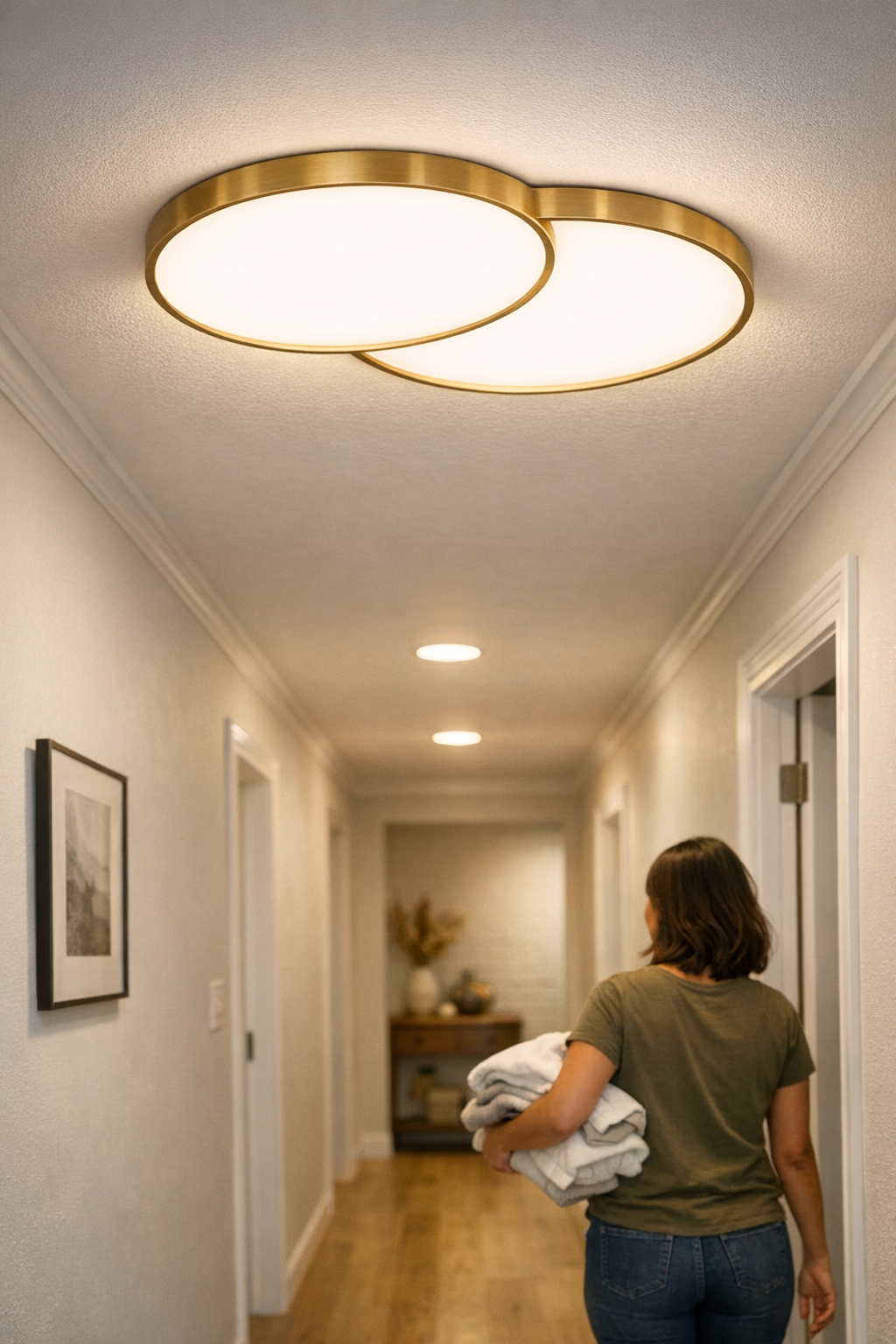
    Most hallway lighting setups fail for a reason you notice only after repeated use: the path itself stays uneven, with shadow breaks at every threshold and corner. Take a week of late-night cross-room trips—arms full, zero spare hand for a switch—and you’ll realize a single ceiling fixture might look tidy, but it leaves gaps where you need light to work, not just appear. The surface underfoot picks up pools and edges of dimness, especially near doorways. Corners dull out, familiar objects get lost in low patches, and suddenly the “minimal” lighting choice feels like a source of daily drag instead of a solved problem. You can promise yourself you know the layout, but stepping blind over a misplaced cord or squinting for keys that fade into a shadow strip is friction you repeat, night after night. Hallway lighting reveals its quality not at a glance, but in every imperfect crossing after dusk—when you rely on clarity, not just brightness.

    Recognizing Where Single Fixtures Fall Short—A Routine Test

    A centered ceiling light is sold as the simplest answer, but actual movement reveals where it breaks down. As you pass from the fixture’s direct zone, shadow lines gather at walls and doorframes—the exact points you pause, step wide, or slow down to check a surface for clutter. You only need one awkward reach to spot whether the floor is hiding stray mail or a child’s shoe. Most schemes give the illusion of coverage, but only if you never leave the center of the beam.

    This is really about usable reach, not total wattage. Coverage means you see the lines you walk, the zones where shoes collect, the thresholds you’re crossing, and don’t have to guess what fades away after dusk. Once daylight vanishes, any interruption—every missed spot or lingering patch—means wasted seconds, extra hesitations, or retracing steps for dropped items. It’s cumulative friction, not just a dark patch—something you only notice through repeated trips, not first impressions.

    Linear and Panel Lights: Building Steady Corridor Coverage

    Linear or low-profile panel ceiling lights disrupt the old pattern. Instead of spotlighting the middle and abandoning the edges, a run of panels pushes an even wash end-to-end, making the whole walk—from main room to far bedroom, through each doorway—a single readable path. There’s no broken sequence of bright/dim/bright, no need to track your own steps for safety. Placement, not just product, makes the difference.

    Where it’s impossible to ignore: windowless or narrow halls, or older layouts where doors cluster unevenly. Even in new homes, a corridor used as storage or laundry pass-through will quickly show the weak spots. The tension isn’t over-lighting but removing invisible obstacles—making each movement predictable, letting you spot clutter or surface changes instantly, no matter the hour or traffic.

    Where Most Setups Still Slip: The Gaps Between Fixtures

    Too many solutions fail by spacing fixtures flush or too far apart—no overlap, just exposed seams between “zones.” Walk the same hall at night: you spot foot-wide stripes where light weakens, feel the drag as you slow for uncertain footing, or sense guests side-stepping a semi-lit step. It doesn’t matter how sleek the panels look; a single miscalculated gap turns a decorative upgrade into a patchwork of hesitation zones.

    This isn’t subtle once you notice it. The so-called finished job still asks the same routine questions—should you watch for a trip hazard, should you flip another switch, should you grab your phone’s flashlight? The actual fix is measurable: intentionally overlap each panel’s coverage zone by 30 to 50 cm. This is what blends surface visibility and keeps the walk continuous. Ignore this, and the setup visually resolves but leaves daily use unresolved—a premium surface with low-grade results.

    Everyday Consequences: What Repeated Use Actually Shows

    Lighting that “looks good” often disguises weak surface logic. In a regular week:

    • You keep shifting your walk to dodge a dim strip at the wall, even when you know the route is clear.
    • You reach for dropped keys or check for shoes, only to have them slip into low-contrast shadow bands by the door.
    • Visitors stall at the stair landing or darkened corners, unsure if the floor is safe past the last bit of light.
    • Mail and bags linger unseen by the baseboard, missed until the whole main room fills with light.

    Every time you slow, scan, or sidestep, minor lag piles up—especially with kids, older adults, or arms full of laundry after lights-out. Efficient movement exposes lighting’s true function: not looking resolved, but letting you navigate without question.

    Not Just for Narrow Halls—But Especially Needed Where Light Doesn’t Reach

    Wide or open corridors soften the difference, but long, narrow, or windowless runs betray every skipped detail. Unblended sections lose clarity exactly when routine needs it. Even a flawless ceiling line is empty credit if memory, not vision, is doing most of the work. If you find yourself assuming, not seeing, what’s in the next step, it’s a sign your lighting favors decorative order over functional safety.

    For these problem zones, 30 to 50 cm overlap between panels is not theory—it’s an everyday defense against uncertainty. The best sign you’ve fixed it: you quit pausing, you never sidestep clutter, and guests move naturally through every doorway, at any hour. The moment hesitation disappears, you’ll know the coverage finally matches the corridor’s needs.

    Making Small Adjustments That Fix Daily Friction

    You rarely need a full overhaul. Often, swapping a single central fixture for two slim, overlapping panels right where you hesitate—at the busiest entry or underused corner—fixes months of unnoticed frustration. Post-adjustment, the entire length is readable, even after sundown. Missed piles by the wall, awkward threshold shadows, the quick “is anything there?” check—gone. This is clarity designed to match movement, not just appearance.

    Targeted, practical corrections include:

    • Mapping and lighting the precise transitions—putting panel overlap precisely where steps and sightlines stall, not just centering lights for symmetry.
    • Verifying overlap rather than installing panels edge-to-edge—no blind seams or dim stripes left for routine to expose.
    • Tracking the setup across a week: if you’re still pausing, if new shadows emerge, reconsider fixture position before declaring the job done.
    • If support hardware—cables, brackets—spring into view or disrupt the ceiling line, refine the mounting choice, not just the fixture, so tidiness and usable light support each other.

    Only repeated passage, not a single walkthrough, will confirm what works. Corridor setups that prioritize overlapping, real-use zones—over default placement or visual emptiness—quietly strip away hassle and expose whether the upgrade is actually working for everyday movement.

    When Appearance Outweighs Use—And How to Spot the Difference

    The drive for minimalism often blindsides actual function: a solitary fixture, an unbroken paint line, and the finished look that satisfies only until darkness multiplies your hesitations. With weeks of living, the test isn’t how seamless the ceiling seems—it’s how often you still slow, detour, or resort to your phone’s light. “Clean” ceilings that leave you compensating with extra switches or cautious movement are uncompromising in appearance but weak in routine use.

    Real hallway lighting ends the guesswork and reroutes of daily life: no habitual sidestep, no double-check for each step, no invisible piles by the edge when moving at night. Achieving this doesn’t mean packing the ceiling with fixtures; it means recognizing which spots your habits keep exposing, then intentionally resolving those missing lines with practical coverage—not just presumed design simplicity.

    Summary: Corridor Lighting Built for Routine, Not Just Show

    Across weeks of use, the costs of incomplete lighting quietly accumulate—minor delays, missed items, and transitional slowdowns. Switching to continuous, intentionally overlapped panel or linear lights isn’t just about brightness—it’s about erasing the practical gaps that trip up daily movement and decision. A good corridor setup disappears in use: no forced pauses, no blind merges, just a well-lit, frictionless path at every hour. When overlap, distance, and finish all support real-world habits, hallway lighting finally solves more than it shows. For setups that actually handle repeated routines, not just empty rooms, clarity is the upgrade that matters.

    http://www.lightsupport.myshopify.com

  • Why Cable Sleeves Can Slow Down Your Desk Adjustments and Moves

    The instant your desk needs to slide—even to squeeze in a storage drawer or shift for a new monitor arm—the flaw in cable sleeves stops being theory and turns into wasted time. That neat cable “fix” you zipped up last week? Suddenly it’s a knotted leash, holding every wire hostage and reminding you that workstation order isn’t only about looks. Keyboard, power, USB hub, charger: packed into a sleeve, they seem invisible—until you need to move, adjust, replace, or swap anything in a setup packed with devices. Sleek cable tunnels might win the battle for appearance, but in the real cycle of shifting screens, pulling notebooks forward, and adapting to each work burst, they turn simple changes into a slow-motion struggle.

    When Organized Looks Meets Real-World Friction

    Cable sleeves sell the promise of instant order: run every cord into one sleeve, zip it tight, and for a moment the chaos vanishes. For a shallow desk crammed against a wall, or anywhere leg space already feels pinched by storage boxes or file drawers, it feels like a win. One move and the floor’s clear, the desktop open.

    But routine friction builds fast. The first time you swap a device, scoot a monitor, or yank a charger for a laptop you take to a meeting, you realize every cable is now trapped in a bundle. Need to unplug one camera or gamepad? You end up wrangling the whole bundle, sliding out ties, sometimes even moving the entire tray. What felt like organization at setup turns into a barrier at the exact moment you want speed.

    Adjustment Bottlenecks: How Minor Moves Become Major Obstacles

    Real workstations never stay still for long. One hour it’s a focus screen for a call, the next it’s scribbling notes or shifting a second monitor front and center. Now, every adjustment comes with resistance: push a monitor an inch closer and the cable sleeve strains at the grommet, the cords yank against each other, and even a gentle slide becomes a two-handed job. Instead of a simple move, you get cable drag and sudden tension that can nudge USB hubs loose or lag out webcams. You can watch your own routine slow down—cables bunching as you twist the monitor, desks jammed deeper under their own cabling, and reset cycles grow longer with each device added.

    The Slow Unravel: Move Days and Reset Cycles

    Every full reset makes the cost unavoidable. Move to a different wall, add an under-desk storage box, lend a monitor to a coworker, or just run a fresh cable to a new lamp, and suddenly you’re unzipping sleeves, breaking open bundles, and detangling the entire path for one minor change. You waste minutes tracing the route through the tray—even if all you needed was a little extra slack behind the screen or to slip out a power brick. Instead of a five-second adjustment, you get a full desk tear-down, and the next reassembly is rarely as clean as you started.

    Why Open Cable Management Cuts Down Reset Pain

    Compare this to a modular, open solution: a tray or cable box under the desk, held by loose Velcro or clips, so each cable runs where it’s needed, not trapped in a single path. It doesn’t look showroom-ready—but it means adding, moving, or replacing a device only requires touching the cables that matter.

    Want to shift your monitor? Release a clip, adjust the cable, and snap it back—done. Need to plug in a charger or swap out a tablet? No sleeves to unzip or bundles to untie. Over weeks, these tiny, low-friction moves add up: the desk remains a functional workspace, not a staged photo or a reset headache. You go from fighting your own order to letting the surface adapt with you.

    A Real Routine Change: The Desk After Two Moves

    Two move days and one too many battles with a nine-cable sleeve forced the switch: all device lines now rest in a shallow tray under the desk edge, with only monitor power loosely clipped to avoid sag. Instead of fishing through a tight sleeve, you see each cable, pop the one you want free, and everything else stays put. The time to reroute for storage or change a device drops from twenty minutes to under two. The shift is clear after every “reset”—you stop dreading the cycle where a reorg feels like another round with a cable-shaped anchor.

    Quick-Scan Moments: The Small Decisions That Matter

    • Swapping out a keyboard mid-task? A single reachable clip means the new one’s in place instantly, not as a five-minute detour through bundled cords.
    • Adding a charging brick for a new phone or device? You lift, drop, clip, and continue—without taking apart every under-desk wire just to make a path.
    • Switching monitor positions for a team brainstorm? The cables stay where you want—no pulling tension, no jostling the whole desk to avoid over-tight connections.

    FAQ: Real Answers from Desk Routine

    Do trays just make a new mess?

    If you keep cable clips spaced out and trays tucked under the desktop edge, the mess stays hidden and access stays easy. You lose the tangled path but keep the benefit of a smooth reset—without crowding the visible workspace.

    Are loose cables just visual clutter?

    Not when managed in short, reachable runs. A hook or tie every few inches keeps cables controlled but easy to move. The real trick is tuning visibility to function: keep things “neat but not locked,” hidden just below desk level where they won’t interrupt reach or glance.

    What’s the main functional problem with sleeves?

    Packing all cables together means every change turns into a bundled fight—pull one cable, everything moves. It builds tiny points of tension and leaves regular desk adjustments far slower, straining ports and connectors that should last.

    Choosing a Management Style That Keeps Pace With You

    It’s easy to chase a showroom-calm desktop, but cable sleeves trade friction for looks. If your days involve recurring device changes, monitor tweaks, or even just clearing space for fresh notes or team-side work, modular solutions—trays, ties, clips—keep your setup working as hard as you do. The trade-off: a hint of “real” replaces the illusion of perfection, but in exchange, your desk stops fighting back every time you need to adapt.

    Explore the full WorkBasic collection

  • How Defined Lighting Boundaries Improve Safety in Homes with Kids and Pets

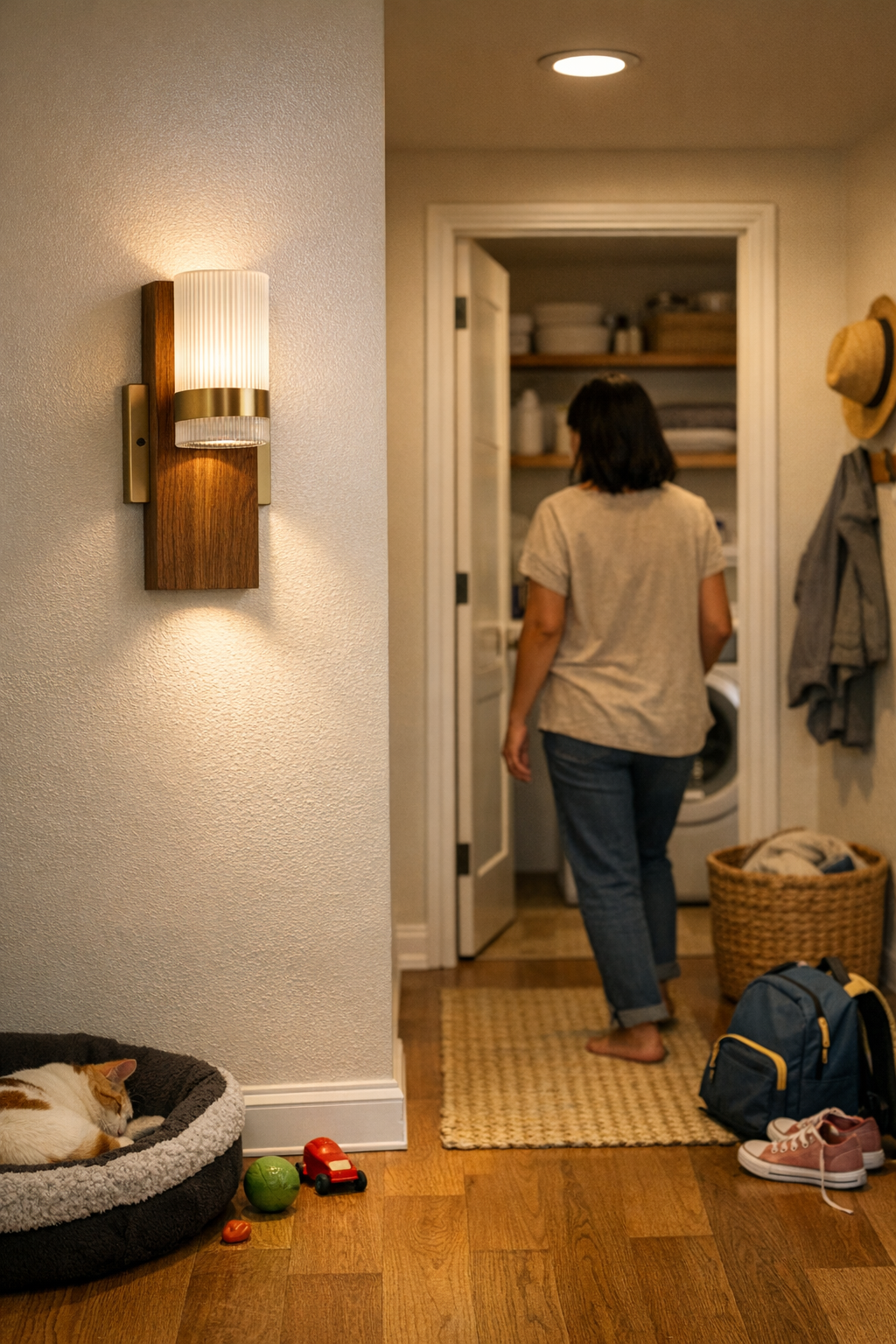
    If your lighting only treats the room as one big “nearby” area, reality pushes its limits fast—especially in a house with restless kids, pets circling for territory, and routines built on movement, not empty space. That ceiling fixture that looked bright and open on day one will start to betray real problems by week two. Toy piles gather back into walking paths. Pets claim the warm spot that cuts through the route you need. What seemed like even light turns patchy, with glare near the ceiling and unpredictable shadows at your feet. Suddenly, the room looks bright but works badly: the difference isn’t how much you see, but what keeps landing in the way—tripping you up, slowing you down, and making the space feel less usable the busier it gets. This isn’t a design quirk; it’s a direct consequence of the lighting setup itself.

    Why Room-Wide Lighting Fails During Real Routines

    Turn on the main ceiling fixture and it feels like you’ve handled the basics. But as routines stack up, the flaws get sharp. Homes don’t work as blank cubes; real life creates conflict zones—main paths, parking edges for bags or toys, pause points for noisy kids or a dozing pet. Central ambient lighting erases these distinctions, blurring lines you need clear. In heavily used hallways or near the utility zone, gradients take over. Parents notice it first: you dodge one obstacle, then another appears, never quite seeing where the “safe to move” area ends because the light never marks it. Tired? You miss it entirely—and risk a stubbed toe or worse.

    Think of a hallway on a Thursday night. Light spills everywhere, but the stuff you need to avoid—bags, scattered shoes, a pet deciding to settle—moves right up to where you walk. There’s no obvious signal: just a slow fade from “clear” to “not quite,” forcing constant split-second choices. You don’t fall—you just learn to hesitate, to curve your step, to scan shadows for what the fixture failed to separate.

    How Shadow Lines Interrupt Simple Movement

    Soft, undefined lighting leaves disorder free to migrate. One moment a child bursts through and drops a backpack near the kitchen. The family pet stretches out—half-on, half-off the edge of the walking lane. Overhead fixtures do little to distinguish zones: sometimes the floor’s edge vanishes in deepening shadow, sometimes glare leaps up from polished tile. What should be a straightforward movement becomes tactical—slowing at turns, bracing to spot hazards just before you hit them.

    This is the slow drag of bad lighting: everyone adapts, but in ways that turn routines jagged and frustrating. You learn to sidestep by habit. Movement becomes a mental task, not a simple walk—never quite trusting what’s beyond the next shadow, never sure where the usable space really ends.

    Real Scenes: Where Weak Lighting Edges Cause Trouble

    Pausing at the stair turn

    The landing is more than a step—it’s a decision point, a pause with consequences. A single overhead light turns the stair’s edge into a shifting gray area. A dropped toy or stray laundry basket lingers unnoticed. Until someone’s foot catches; now the edge matters. Nearly every household endures a near-miss before catching the problem: indistinct shadow means nobody knows exactly where safe ends and risk begins.

    Crossing the hallway with clutter close by

    Children carry, drop, and forget. Pets prefer settled corners. Hallway fixtures that just flood everything don’t warn or shape behavior—they blur it. Every trip down the hall tangles with confusion: Is this gap wide enough? Was that a bag or just a shadow? You catch yourself twisting, changing speed, not trusting what’s ahead.

    Losing the counter edge in shadow

    Faces lean into mirrors, or hands scramble for the last cleaning wipe on the utility counter. Surface lighting that looks “uniform” from across the room can’t stop shadows from one side swallowing half the workspace once you approach. The edge of the basin blurs. What’s safe to grab, what isn’t? You adapt by moving, leaning, craning—because the light won’t do its job.

    The Consequence: Routines That Never Feel Smooth

    These aren’t catastrophic failures—but they’re relentless. When movement lanes and storage edges blend, families start tiptoeing through their own routines, correcting as they go: nudging shoes, barking “stay!” at the dog, giving children an extra warning to keep backpacks clear. This is creeping friction: not enough to bring things to a halt, but enough to create constant, low-level stress, and a chronic sense that home layouts resist rather than support movement.

    What Actually Defines a Reliable Lighting Boundary?

    Boundaries aren’t established just by throwing more lumens at a ceiling. They’re created when lighting makes the “in” and “out” zones visually speak for themselves—a clear, observable edge separating movement and pause, safety and pile-up. Average overhead fixtures fill everything, but they don’t mark territory. If the light doesn’t draw a real line, clutter and behavior slowly creep back into your path, because nothing says “this area’s for walking, that area’s for waiting.”

    The Practical Change: Zoned, Offset, or Downward-Focused Fixtures

    The difference between ongoing frustration and quiet traffic flow is physical: use lighting to mark, not just light. Offset wall sconces, for example, installed just outside a stair run, cast a repeatable band that reads “safe passage.” Shifting a semi-flush mount fixture toward the main side of the hallway defines a dominant path, with softer spill relegated to the waiting zone. Task lighting over utility counters or bathroom sinks puts brightness right where you need to see and act—leaving the rest softer, less tempting for clutter or temporary holding.

    What really happens after these changes? Slowly, habits shift. Pets nap in the softer shadows. Kids learn, almost invisibly, to drop shoes beyond the well-lit lane. The main path stays clear—without anyone policing it—because the space itself supports what you want to happen, not just what a fixture can theoretically cover on paper.

    Everyday Improvements You Actually Notice

    The signs of better lighting aren’t dramatic makeovers—they’re the smaller frustrations that finally subside:

    • Navigating stairs without pausing to wonder what’s at the edge or dodging an unnoticed toy.
    • Pets choosing the dimmer, safer part of the room, left automatically out of circulation zones.
    • Countertops with visible, shadow-free edges—making cleaning, prep, or grooming straightforward, not guesswork.
    • Hallways that feel designed for motion: clear, direct, free from the slow drift of clutter back into your feet.

    If lighting only suggests where boundaries might be, confusion sneaks back in—every crossing, every sudden pause, every overlooked object. But when the lighting draws true edges, everyone reads them and home routines gain a smoothness you stop noticing for the best reason: nothing is blocking your way.

    Quick Tip for Improving Zone Edges

    To spot weak edges, stand at a usual pause-point—stair landing, hallway corner, or near a counter—with main fixtures on. See where space feels ambiguous, where movement seems tentative. Then turn on a directional sconce, vanity light, or even use a flashlight: does a clearer edge or brighter path reshape how you treat the area? That’s the start of fixing not just how a space looks, but how it works.

    Lighting That Holds Up to Real Life

    The gap between a “bright” room and a functional one opens wide after enough lived-in days. The right indoor lighting isn’t about filling volume with light—it’s about giving daily movement a clear, reliable map. Homes that hold up to repeated family use, shifting clutter, and unpredictable routines don’t just look good; their lighting quietly prevents problems before you even notice them.

    Explore practical indoor lighting that makes your spaces easier to use—day after day—at LightHelper.

  • How Thoughtful Lighting Placement Eliminates Glare and Boosts Comfort

    A workspace can look flawless and still undermine your focus every day—usually because the lighting or its mounting keeps getting in your way. Sharp glare hits your screen by the afternoon, a cable snakes into your arm zone no matter how many times you push it back, or the under-shelf light glows but leaves the work edge in shadow and your eyes straining. You adjust and rearrange—tilting a screen, rotating a lamp, nudging a pile of papers—until the “tidy” setup becomes a source of constant friction. Surfaces look clear until the first real task begins; function breaks down faster than appearance.

    Why the Neat Look Doesn’t Last

    Minimal fixtures—flush wall panels, hidden cables, slim bar lights—can sell a photo-ready calm. But most setups built for looks fall apart the moment you move, reach, or turn. Comfort isn’t captured by a still image; it’s tested over hours of use. That “finished” vibe evaporates as soon as the first reflection slices across your laptop, the lamp’s rigid stance pins your shoulder in place, or an exposed cord keeps grazing your knuckles.

    Glare lines, visible cabling, and forced positioning aren’t just annoyances—they’re the daily price of setups built for presentation, not for how people actually work or reach for things. Desk, table, or shelf: the same signs show up if design has outpaced function.

    Small Problems Become Daily Obstacles

    You can tuck a cord or push a lamp out of frame, but live with it and certain problems reveal themselves fast. That reflection—always at the same hour. The cable—always finding its way into the one area your hand needs clear. Setup “calm” unravels into focused friction: an edge you can’t see, a lamp you keep dodging, a glowing shelf but a murky desk. After a few days, distraction feels baked in. And you notice you’re working around your lighting, not with it.

    This type of friction doesn’t fade with time; it accumulates. Lost focus, hunched seating, corners left unused—all from small, repeated adjustments subconsciously made to dodge your own lighting or its support hardware. The original logic of the setup turns into a daily workaround routine you never signed up for.

    How to Catch the Real Trouble Points

    If you’re reaching to prop a folder against a reflection, shifting your chair to avoid a glare hit, or angling a monitor to escape a spotlight, your lighting support is out of sync with your needs. A beautiful lamp aimed wrongly becomes a daytime obstacle. The wrong mount means good light in the wrong place, every day.

    There’s a gap between setups that win on looks and those that just work. For example:

    • An under-shelf light washes the wall with a bright, even glow—yet each keypress bounces glare into your eyes, making the surface harder to use than before.
    • A clunky but correctly aimed task lamp misses any style contest but leaves your full work area visible and your routine uninterrupted, even as daylight shifts or projects overlap.

    One setup looks resolved; the other is actually liveable. The difference: You don’t notice the good one at all while you’re working.

    Placement, Spread, and Support: The Deciding Details

    Lighting that works for real life depends on where the fixture sits, how the beam lands, and where cables run once you start using the space. The moment you enter the third work session of the week and still find yourself fighting cord drag or dodging hotspots, tiny mounting details become critical.

    These failure points keep showing up in practice:

    • Wall panels casting perfect ambient light—until you sit down and your monitor catches a sharp line from above, making half the screen unreadable.
    • Under-cabinet LEDs that skip the shelf lip, leaving your hands in shadow every time you write or reach.
    • A cable run planned to look neat, but each time you move your mouse the cord slides forward again, intruding on valuable desk space.
    • Ceiling lights with zero adjustability: whole sections of the table are washed out while corners go dim, demanding extra lamps just to get balanced coverage.

    These aren’t quirks—they’re signs that aesthetics won over use, and now distraction is routine. The tell is always in how many times you have to adjust, shift, or mentally filter out your own lighting or its supports.

    Scenes From Real Use: When Support Makes or Breaks a Space

    The Shared Table Dilemma

    Think of a broad worktable near a window, meant for several people. Built-in wall lights glow evenly and cables are hidden; everything looks deliberate. As the workday unfolds, sunlight shifts, screens tilt, and the designer glow fires straight across laptops and tablets. Soon, people start stacking folders in awkward spots to block the line of light, chairs migrate to less “featured” sides, and eventually everyone huddles near the only clamp lamp—visible cables and all—because that’s the one source they can aim. Style points drop, but the adjustable task lamp survives the workday. What looked seamless is now background noise; what worked wins in silence.

    A Small Change, Big Relief

    Different space, new pattern: A glass top desk beside a window, lamp base set barely forward of the right spot, and the cable runs clean through a discrete under-desk clip. After hours of glare on the work zone, a quick nudge pushes the lamp back a couple inches and tilts the head. Now the cord never strays, the glare line doesn’t return, and the space finally stays usable all day—no more sliding things around to adapt to stray beams or loose cables. The change isn’t dramatic to the eye, but noticeable in how you can actually use every inch of the surface without tense readjustment. That’s what material support does—quietly clears the way for real work, not just a staged look.

    Practical Fixes Worth Trying

    Improvement isn’t about a wholesale upgrade. Adjusting a fixture by inches can revive a whole setup. When overhead or wall lights throw too much glare, adjust the angle or drop in a lower, aimable task lamp outside your immediate eye line. Cable clips, tension guides, or a small wall bracket can push cords out of the performance zone completely—no more taping or tucking after the fact.

    Matte finishes on task lamps crush nuisance reflections. Placing a fixture so beam edges sit just outside your common reach zone removes bright streaks without inviting clutter. The real test: Watch what you’re still adjusting at hour two, or what work area you quietly avoid. Shift the support—lamp, bracket, or guide—first, and see if routine friction finally lets up.

    The Quiet Payoff: Support that Actually Fits

    The best setups disappear in daily use—not because they’re invisible, but because they stop interrupting you. That’s the win a support-first mindset delivers: cables that follow natural room lines, brackets that keep fixtures steady and off your hands, and beams that stay out of your vision. No more constant contorting, guerrilla fixes, or asking “what’s wrong with the light here?”

    When you stop making micro-adjustments and just get to work, you know the lighting—plus its mounting and cable runs—finally fit the way you move and focus.

    Find practical lighting and mounting solutions that work for real rooms and real routines at LightSupport.

  • Why Structural Cable Management Transforms Your Desk Setup Experience

    Every time a cable slithers off the back edge or a phone charger drops behind the monitor, you’re reminded that a good-looking desk can turn unreliable fast. Resetting becomes a ritual: crawling under the surface, fishing out power cords, re-routing what slid out of sight. What stalls progress isn’t a tangled nest—it’s the accumulating drag of cables that won’t anchor, turning a desk that looks organized in photos into a workspace that keeps interrupting itself. The real difference between reliable and awkward comes down to whether your cable management actually holds during real, repeated use—not just when everything is freshly tidied.

    Why Appearance-First Cable Solutions Rarely Last

    The first setup always looks promising: cords routed through crisp sleeves, adhesive clips placed with geometric care, a sweep of clean desk space. But real work exposes the gap between tidy and durable. Sliding a notebook to the side, leaning in to reach your second monitor, or shifting your chair for a midday stretch—all these micro-movements test the strength of any surface-level fix.

    By the end of the first week, visible order unravels: The temporary grip of adhesive clips gives out as cables get nudged, pulled, or switched with each device swap. Any sleeve built for visual unity becomes its own jam point—adding a single new cable requires tugging the bundle apart. The clutter disappears only until the next routine reset, and most “minimalist” systems devolve into frustration: cables that haven’t tangled now hide just out of reach, caught behind drawers or dangling out of sight under the desk.

    The Subtle Frictions That Don’t Appear in Desk Photos

    It’s easy to miss the tension in a staged workspace; the problems show up between tasks. You notice the pause when your charger slides out of reach, the drag as your mouse cable snags on a sleeve edge, the dull moment of recalibrating your posture because a stray loop caught your foot.

    Try picturing a normal setup: two monitors, charging cables weaving between a clamp-on lamp and a laptop, a notebook crowding the space beside your keyboard. By mid-afternoon, the cable that started the week neatly routed is now drooping beneath the monitor or knotted into the drawer track. Push your chair back and your heel hooks a cord loop—or worse, pulls a lamp off its balance. The interruptions aren’t dramatic, just steady: cables drift, pull at hardware, and require another round of fixing before the session can really start again.

    Resetting gets slower every time. What breaks workflow isn’t visible chaos—it’s the ongoing hassle of untangling chargers, reaching behind panels to find missing cables, and re-clearing space that looked organized but didn’t actually stay that way. Each unplanned fix is another interruption, eating away at the usefulness of a space that should stay ready between work sessions.

    What Actually Holds Up in Everyday Desk Use

    The setups that survive aren’t prettier—they’re anchored. After getting fed up with adhesive clips peeling up and sleeves bunching cords together, switching to a metal under-desk cable tray changed the daily logic of the workspace. Suddenly, cables had only one path: up from the floor, across the tray, down within reach, never looping loose or dropping behind hardware. The mess didn’t shift location; it stopped returning altogether.

    Now, plugging or unplugging was routine—nothing to realign after sliding a monitor, no adhesive to replace, no reaching into a sleeve to fish out a missing charger. Even over weeks, the system held up: no sprawled cables under the chair, no sudden loss of leg room, no accidental yank pulling a cord free. The practical improvement wasn’t a cleaner look, but a guarantee that every morning, the same cables stayed in the same accessible places—making each return to the desk feel less like a reset, more like resuming where you left off.

    When Cable Management Choices Really Matter

    The real test shows up in high-change spaces—shared desks, sit/stand workstations, anything with a tight footprint. Loose, appearance-first systems break down first: what seemed organized yesterday devolves after a few adjustments or swaps. In smaller setups, even one or two mobile cables crowd the floor and limit how freely you can shift in and out of your seat. With every device connection, each structural choice reasserts itself: cables fixed in trays or with rigid clamps stay accessible, while everything else migrates, knots, or drops off course.

    It rarely matters how many devices you have. The core failure is weak anchoring: every back-and-forth between desk and chair, every time you plug in a new charger or re-route display cables, anything not properly anchored turns into a self-sabotaging obstacle—one that turns a fast reset into a repeated maintenance task.

    Real-World Cable Management Observations

    Tabletop neatness isn’t the same as lasting use. Cables that disappear for Instagram reappear in real workflows: catching on chair wheels, wedging under drawer units, falling out of reach when you reposition equipment. Under-desk drawers that seemed like extra storage quickly start interfering with movement or cable path, especially if not paired with real cable clips or trays.

    Sleeves look contained but become tedious if you need regular access—every charger or adapter added or removed disrupts the whole run. Cable boxes work for stationery power bricks, but most aren’t designed for quick in-and-out, so swapping or moving high-use cords just adds another hassle. Over time, only solutions that don’t need weekly fixing stick—like fixed trays or hard-mount clamps you set up once, then stop thinking about because they simply keep working job after job.

    Quick FAQ: Test Your Setup’s Real-World Staying Power

    How do I actually stop cables from slipping off my desk during work?

    A hard-mounted cable tray or strong clamp under the desk edge holds cords in place regardless of cleaning, chair movement, or reaching for accessories. Adhesive clips may help at first but almost always loosen over time as cables get handled and flexed.

    Is spending time on under-desk cable management really worth it?

    If you swap laptops, move monitors, or recharge phones and tablets multiple times a day, anchoring cables with fixed structure pays off sooner than expected. You save time by not crawling or fishing for charger ends, and daily resets get faster, not slower—meaning fewer interruptions and less rebuilding your workspace from scratch.

    Are cable sleeves and boxes actually helpful for repeated access?

    Sleeves work best for rarely moved cables. For chargers or accessories you use several times a day, sleeves and tightly packed cable boxes just slow you down, since pulling out one cord usually means untangling or opening up the whole batch. For repeated access, leave high-use cables anchored but separate—tray or clamp, not bundled shut.

    Small Changes, Big Difference—Why Lasting Structure Matters

    Desk setups that look organized but can’t hold their shape under real use end up costing more time, not less. The difference isn’t a neater surface; it’s whether every wire stays where you left it when you come back. Over countless work cycles, durable structural choices—anchored trays, proper under-desk mounts—transform frustrating, slow resets into a background habit you rarely notice. A ready desk isn’t just tidy; it’s one where the cable mess doesn’t keep coming back.

    Explore the full WorkBasic collection