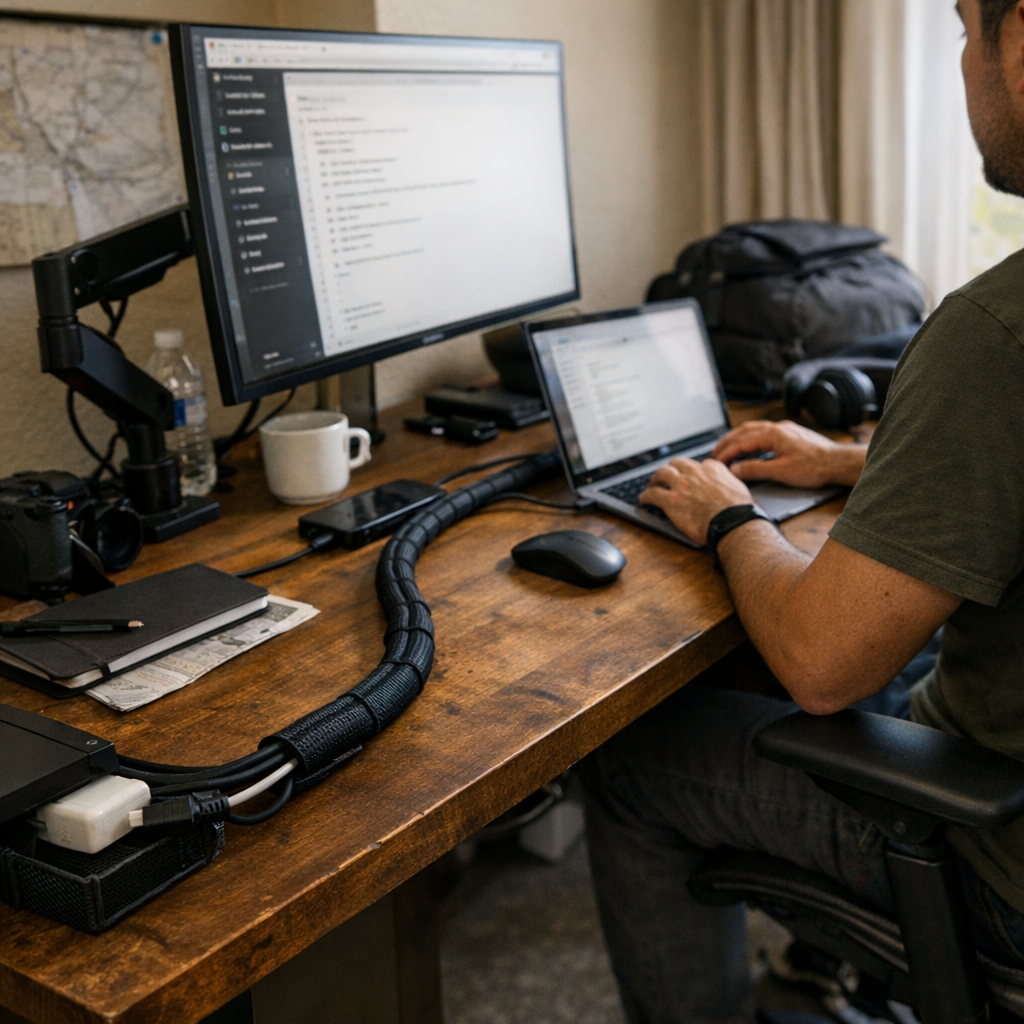
If you depend on a travel workstation—think hotel desks with shallow depth, airport charging counters already crowded at the edge, or another reshuffled co-working table—your approach to cable control isn’t just about appearances. It’s a repeated test of how fast you can actually reset, pack up, and get working again when routines aren’t stable. Loose cables and “temporary” solutions might seem flexible, but after three or four cycles, the reality is slower: cords snag under power bricks, twist around bag handles, and always seem to block your reach for a notepad or charger, even on a desk that still looks technically clean. Setup friction piles up in small, annoying ways—each time you break down or restart—until getting organized isn’t just about how your workspace looks, but about cutting the minutes lost to hunting, untangling, and fixing what repeatedly slips out of place.
The Real Cost of “Looking Organized”
A tidy surface often hides a cycle of small slowdowns and missed details. Maybe your setup looked flawless on day one: every cable wrapped and laid flat, phone charger tucked out of the way. But by day four, the story changes. Cables ride up over the desk edge, the HDMI cord disappears behind your keyboard tray, or your phone charger gets pulled tight around a notebook, making it harder to reach both at once. “Streamlined” starts to mean “guesswork under time pressure,” especially if your desk space doubles as last-minute storage—crowded, unpredictable, and just awkward enough to keep you distracted during quick work pivots.
Even a carefully rolled cord won’t stay put for long. Every time you plug and unplug, cables inch toward pockets, snag on zippers or seams, and wedge into the gaps in your bag. Reach across for a pen and you feel one drag around your elbow or ride up onto the keyboard tray. No matter how often you reset, if the routine doesn’t change, the underlying disorder returns: tidy desk, tangled access, and that creeping sense your cables are in the way even when they seem “put away.”
The Moment Setup Decisions Make Themselves Obvious
If you push through even a few rapid-fire setup cycles, cable management stops being cosmetic and turns into the real bottleneck. Picture the third hotel desk of the week—there’s a call to join, notes to review, cords tumbling out. With cables grouped in a sleeve, the routine shrinks: one bundle out, charger and video cable ready, desk edge cleared, and nothing hanging loose or stuck behind the lamp base. Plug in and work begins within seconds, not minutes.
Without a sleeve, the pack-up and teardown spiral. One cable hangs behind, another gets jammed under the corner of a notebook, a third slips off the side and vanishes under the desk. You sweep a hand to clear space, but the cords rearrange themselves into new obstacles. Repeating this chaos—after each new session or or trip back to your bag—turns “desk ready” into a source of low-grade stress. It isn’t the time lost in one move; it’s the fact that every session gets slower and more scrambled, dragging down momentum, especially when meetings or deadlines line up back to back.
Cable Control in Real Use
The hidden snag with leaving cables loose is wear—the kind that never shows up in the desk photo. Each rushed unplug leaves connectors twisted, tips bent, persistence wearing thin. By the fifth or sixth setup, at least one cable feels softer or starts failing right where it bends. Bundling them in a sleeve does more than declutter the look; it shields weak points, absorbs abrupt pulls, and keeps the whole set together when fast breakdowns and resets are part of the job. The result is visual: a single line stretched across the desk instead of four separate cords, two always escaping just beyond reach.
Adapting the Desk for Actual Repeat Use
Your tolerance for cable chaos usually cracks after a week of constant moves. For most, the breaking point isn’t the mess itself—it’s the moment you miss something crucial because a cord is stuck, or realize you’re spending more brainpower untangling than actually working. My own fix: a braided sleeve, trimmed just to fit the primary device cords without excess. Not too tight, no leftover tangle, no wasted movement.
Now the cables swing off one side with a single motion. No mistaken grabs. No frayed wire catching midway into a bag. Instead of thinking about cords, my hand follows the same setup path automatically—a physical routine quietly built by repetition, not by willpower. That kind of hidden upgrade doesn’t show up in the first hour, but after a dozen sessions, it’s the difference between steady focus and small, regular slowdowns you barely notice until they’re gone.
What the Right Sleeve Changes for Routine Work
With the sleeve in place, cables drop onto the desk at the same point, every time. My hand knows where to reach—no guesswork, no rerouting loops under a pile of notebooks, no digging to find the right connector. It fixes the specific friction that slips below notice: the seconds lost every single cycle to cables that do not land where you need them. Some quirks stay; it won’t solve every workspace flaw. But for repeated work, it strips away one slow reset you don’t need to keep fighting.
Direct Answers for Real Travel Desk Scenarios
Are Cable Sleeves Better Than Clips for Packing?
If your setup moves more than two or three times a week, sleeves win every time. Clips pin cables in place for static desks but don’t unify them for quick changeovers. A sleeve gathers every cord, holding the entire set as one unit for instant pack-up, so you can shift workstations without forgetting, crossing, or leaving any cable behind. For mobile work, sleeves cut error and reset time, not just clutter.
What If I Need to Swap Devices or Reposition Cables?
The right sleeve matters. If you pick a sleeve that’s too short or too stiff, the bundle fights your movements—and you’re back to awkward, fiddly swaps. A flexible sleeve, cut exactly to the combined cord length, lets everything move naturally. Leave just enough space inside so you can pull or slide cables as needed—overpacking traps them and loses the modular feel. Fit the sleeve to your actual device layout, not a one-size-fits-all solution.
Is Leaving Cables Loose Really That Bad?
It’s tempting to shrug off for a day or two, but each loop left exposed will twist, bunch, or flex at the weak point by the connectors. Every extra bit of sorting—especially when you’re tired or in a hurry—adds unnoticed stress, and that’s when cables fail. If you’re breaking down fast and often, the risk isn’t just clutter; it’s silent wear and surprise breakdowns when you need reliable gear most. Active control stops the hidden damage before you realize it’s begun.
When “Calm” at the Desk Is More Than Surface-Level
The gap between appearances and actual ease-of-use appears after the fifth or sixth repeat. Cable sleeves don’t exist for looks—they’re a minor adaptation that reduces one of the quietest, most persistent interruptions in the real travel-desk routine. A sleeve cut for the way you use your gear simply fades into muscle memory, letting you focus on shifts that matter instead of routine repair.
If your setup feels a little off after each reset—even when it “should” be organized—a proper sleeve might be the single unglamorous fix that sticks. It won’t perfect your workflow, but it erases the friction that keeps a workstation from being as reliable as it looks.