
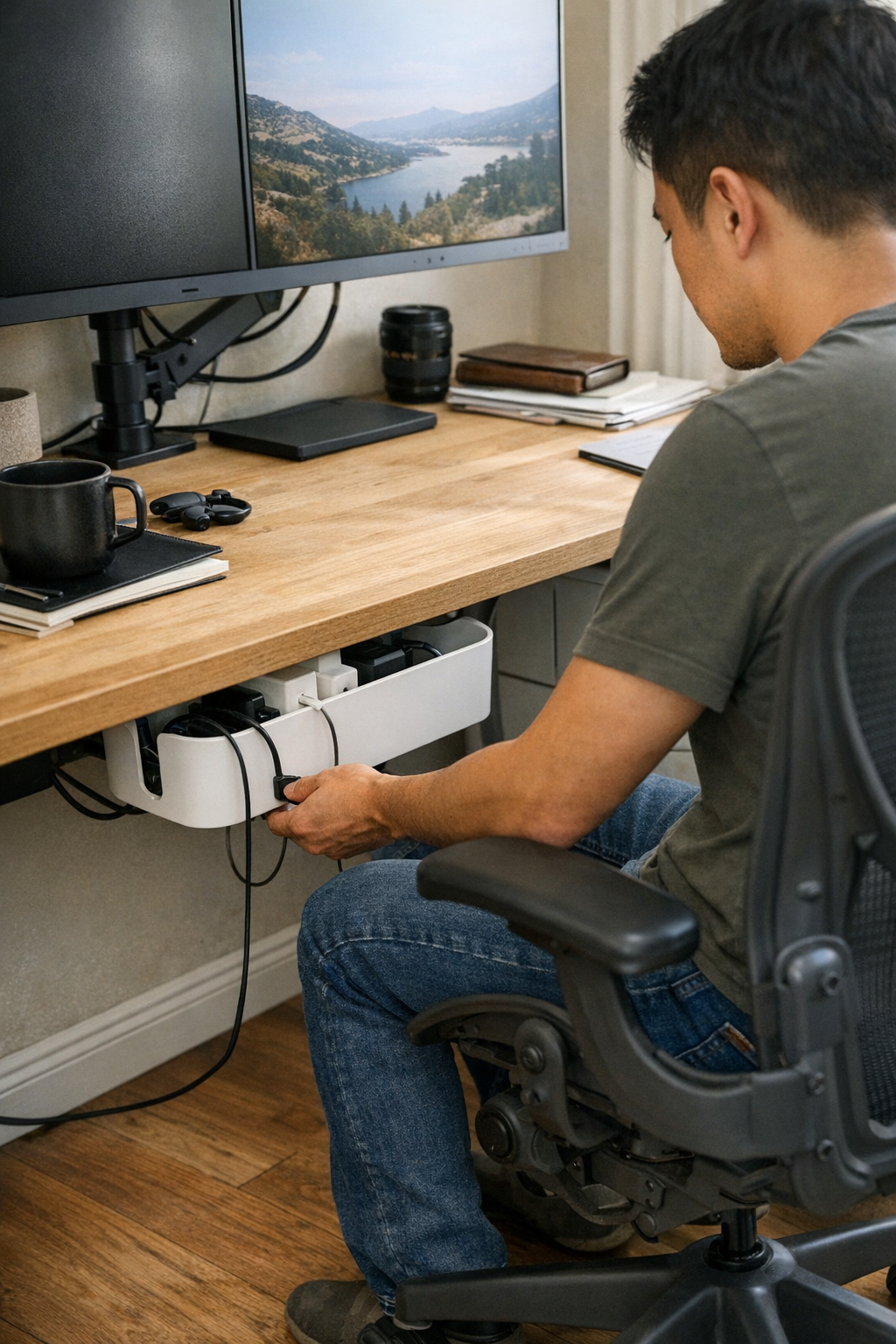
A desk may look organized on day one—chargers lined up, adapters minimized, notepads squared off—but a single week of real work exposes the cracks. By Wednesday, that carefully staged order starts slipping: you reach for a notebook and catch your arm on a stray cable, nudge a cluster of power bricks that drags across the desktop, or feel resistance opening a drawer blocked by cords sliding back into the “tidy” zone. The surface stays deceptively clean, but every routine task—switching devices, shifting a file, sliding your chair in—starts to show hidden friction. The illusion is order; the reality is a desktop that keeps pulling you off pace, one small snag at a time.
Spotting the Slow Return of Clutter—And What Actually Eases It
The easiest mistake? Judging a setup by how it looks just after reset—rather than how it acts after three work cycles. Adapter chaos creeps in quietly. The fifth time you catch a cord on your sleeve or hesitate to charge a device because it means untangling another, the problem isn’t just mess—it’s lost minutes and shifting focus. Stacking adapters in one corner holds up for a day, maybe two, but soon cords snake past the keyboard and “spare” bricks migrate into the prime working area. Desk space that started spacious shrinks fast under the repeat pressure of swapping, charging, and stowing gear.
The underside isn’t a sanctuary, either. A hidden mess—knee-high tangles, loose bricks by your feet—means every device swap starts with an awkward stretch or a blind grab. Quick “fixes” like under-desk baskets often swap clutter for inconvenience; fast changes slow down, and you find yourself picking between tripping on cables or breaking work rhythm just to reach the right plug.
Choosing Where Adapters Live—Tidy vs. Usable
A clear desk doesn’t guarantee a smoother routine—it just hides the friction until the next swap. Clearing adapters into a tray or stashing them behind drawers creates empty surface… but if every phone charge or laptop reboot forces a crouch or a hunt beneath the desktop, you’ll skip organization as soon as you need speed.
The tension is always the same: “tidy but hard to reach” versus “handy but messy.” Mainstay adapters—your daily chargers, laptop bricks, tablet cables—should land in a structure you can reach, move, and reset with one hand, not a two-step shuffle. Mounting a cable box just under the desk edge, or securing a flexible cable sleeve at arm’s length, keeps cables contained without pushing them out of working reach. The desk’s front six inches matter more than most people think: leave it clear and you can move between notebook, keyboard, and screen without pushing against a line of adapters or catching a sleeve on a stray cord.
Case in point: moving a pile of adapters from the desktop corner into an under-desk cable box, placed near the most-used outlet, cut cable drag to zero. No more chasing a charger that slides with your elbow—only a one-handed grab when swapping hardware, with the rest of the surface staying open and interruption-free.
Subtle Routine Changes You’ll Notice by Midweek
The strongest upgrades aren’t always about what’s visible, but what you stop noticing after a few days in use: drawers glide open instead of catching on cords, paperwork moves across the desk without snagging a brick, and hardware swaps drop from a sequence of micro-motions to a single, uncluttered reach. The best sign? You no longer pause to plan around clutter—it just doesn’t get in the way of what you’re doing.
But the equilibrium is fragile. Push adapter storage too far under the desk, and even a quick plug-in feels like an interruption—breaking flow, and tempting you to leave cables trailing across the surface again. Loosely managed adapters creep back into sight, invading arm’s reach and forcing you to start nudging the mousepad, pushing aside paperwork, or shifting your chair to clear knee-space. The real conflict isn’t just “messy” vs “neat”—it’s whether your system still feels frictionless during constant device change, not just after cleanup.
Setting Up for Fewer Interruptions—A Field-Tested Shift
One real change: install a cable box right at the front desk edge, not deep beneath or buried behind drawers. The result? No elbows bumping tangled bricks. Swapping in a new device—laptop, phone, tablet charger—calls for one motion, not a full reset. Prime clutter territory (the front desk corner and drawer edge) stays open, letting paperwork and hardware cycle through without resistance or crowding. This offset—keeping six inches open at your dominant hand—proves crucial: it’s where most mid-session shuffling, quick notes, or screen nudges play out during longer sessions.
Equally important: using cable trays or clips near the desk edge, with just enough spacing, keeps cables from tangling—even after half a dozen hardware swaps in a single afternoon. Fewer cables crossing means less disruption, less time spent untangling, and less risk of yanking something loose when you pull for a charger in the heat of a busy switch.
Desk Routine: Small Decisions Make the Biggest Difference
The placement and structure behind every adapter, tray, and cable path sets the tone for the whole workday. Place a cable tray an inch too far back or wedge a brick deep behind a drawer, and you instantly turn a smooth routine into a workaround—one you’ll keep avoiding until clutter returns on the surface. Instead, aim for cable boxes close to reach, trays for staple device lines, and enough space to bypass other hardware with your hands, not your whole body.
The signals are subtle: if plugging in a device, pulling out a file, or sliding your monitor even slightly slows you down, friction is already creeping back in. Over weeks and months, those tiny interruptions add up—wasting focus, creating fatigue, and making each desk reset longer and more draining than it needs to be.
Real-World FAQ: Desk Corner Cable Fixes
Should adapters be totally hidden or partly visible?
In most functioning setups, a semi-hidden approach is best. Mount cable boxes or trays just off the worksurface—close enough to reach without ducking under the desk, but not spilling back into the main work area. Full concealment looks sleek but slows every swap; fully exposed adapters don’t stay sorted for long and quickly sprawl into active working space.
What helps most with under-desk cable tangles?
Keep cable trays, clips, or sleeves within arm’s reach of your go-to outlets—never buried at the back. Regulate spacing between bricks, so each cable can move freely for a fast swap. Small dividers or built-in guides help keep cable runs independent, especially after a series of hardware changes across a heavy-use week.
Do these changes really cut down on work interruptions?
Yes—less drag equals more usable minutes. Cable pulls and rearrangements shrink, accidental unplugging is rare, and end-of-day resets don’t pile up as background mental load. With visible order and true reachability, you interrupt your focus less and spend much less time fighting your own desk system.
Clearing the Corner—So the Desk Works, Not Just Looks Good
A visually tidy desk means little if you still hesitate before reaching across your corner or swapping devices. Surface-level clarity is not the goal—a desk should handle hundreds of quick changes and movement cycles with near-zero resistance, not just photograph well. That means cables routed off the primary worksurface, adapters close to hand yet out of the action zone, and open space held for actual movement—not for show.
If your end-of-day reset involves dragging piles aside, untangling hidden cables under the desk, or bracing your knees around a loose drawer unit, your setup is signaling unfinished business. The harshest test comes during peak workload: does your system let you reconfigure and keep moving, or do you make another mental note to reorganize—again?
The most reliable workstations aren’t just tidy—they don’t turn small motions into recurring friction or let clutter resurface after every busy stretch. When resisted drag is gone, your focus lasts longer, your desk works with fewer corrections, and your workflow adapts without backtracking—because the structure of your space is actually supporting the pace you need to keep.