
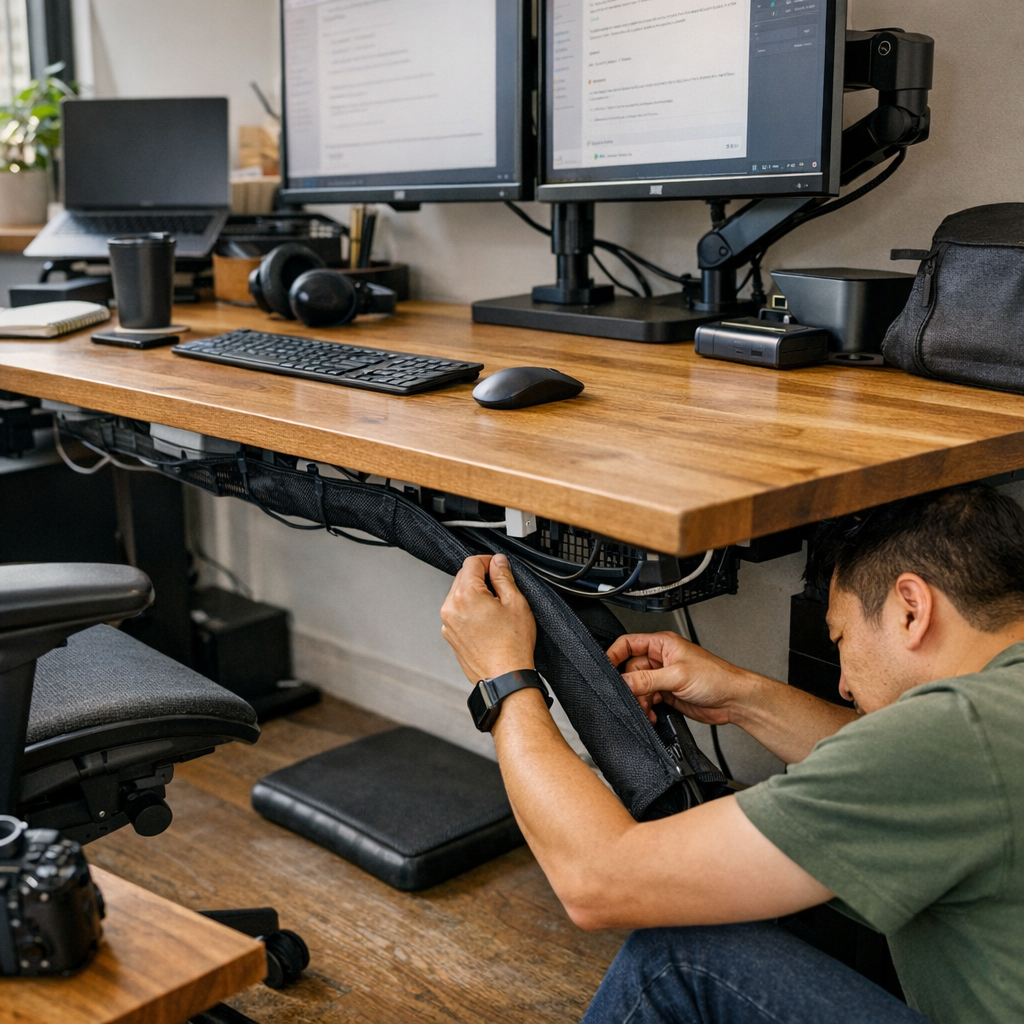
The moment your desk setup needs to change—even slightly—is when cable ties turn from solution to roadblock. That neatly routed under-desk cable run feels satisfying right up until a real adjustment comes: a new charger, a monitor swap, or just shifting a hub closer to where you actually work. Then, everything rigid about the system becomes visible. Now you’re emptying a drawer to find scissors, cutting through old ties, picking up plastic scraps, and unraveling an entire cable route for one small swap. On the surface, the desk stays photo-ready. But in real use, each adaptation means bracing for hassle, delay, and clutter hidden under the order.
The appearance of order vs. the reality of adaptation
Cable ties give you control—a frozen cable path, a locked-in sense that every wire will stay put. But the moment your gear rotates—adjusting monitor risers, swapping docks, unplugging a laptop, or rotating in a new device—that locked-in control breaks down. Every “just add this cable” turns into undoing yesterday’s tight fixings. Upgrades get postponed, workarounds stack up, and the cables you actually use drift outside the official route—trailed somewhere between scheduled reset and everyday mess.
Flexible sleeves interrupt this friction cycle. Instead of going back to square one, you simply open the sleeve, tuck in or move a cable, and close it again—no tools, no fragments, no reset delays. It’s in the friction zone—behind a monitor riser, squeezed along the back rail of a height-adjustable desk, or under a crowded shared bench—where sleeves show their difference. The work flips from maintenance overhead to a quick, lived adjustment.
Real scenes: When cable ties hold you back
Real desk use isn’t staged. You reach to plug in a second laptop, but the first cable is locked mid-air by a tie. You add a USB fan to edge off summer heat, or need to loop in a different dock—each time, you hit the same wall: clear space, cut fastenings, redo an entire cable section just to add one line. Cables end up running outside arms’ reach or tangled at the desk’s edge because changing anything feels oversized. Sometimes, changes just don’t happen until downtime forces your hand.
Sleeves change that: slide, add, close. When you need to flex the setup, it happens in the flow—no separation between working and maintaining. Instead of a lingering side project under the desk, you get back to a state where the cables respond as quickly as your workflow shifts.
The hidden cost of a “tidy” setup that doesn’t adapt
The desk might look streamlined, but if you’re repeating tool hunts and resets just to manage a new charger or keyboard, you’re not working—you’re preoccupied with the system itself. Under a sit-stand desk, it’s typical: cables pinned up, no slack left, each new device setting off a full re-thread. What should be a five-second change becomes a tense, ten-minute reset—pulling trays, backtracking cable ends, picking up tiny cut-offs from the floor.
This isn’t just visual: every small interruption eats into focus. Over weeks, that’s more than downtime—it’s the creeping drag that stops upgrades and encourages awkward workarounds. Upgrades are shelved “for later.” Temporary fixes stick around too long. The cost isn’t just inconvenience—it’s a slower, less responsive workspace, one that gently resists each change.
Making adaptation routine: My own switch to sleeves
Swapping from fixed ties to a zippered sleeve on a 120cm cable tray, the payoff was blunt: the desk didn’t just stay clear, it let me swap, route, or remove cables in seconds, not sessions. New devices slotted in without dragging out scissors or risking nicks to wires. No more loose cable clumps delayed at the end of a busy week, no ritual of tools and tidying. Adaptation became part of the daily workflow—the space stayed organized, but more importantly, it stayed responsive when real changes were needed.
Everyday use: Where sleeves show their advantage
On days when switching between a drafting tablet and laptop, with chargers running to the far side and headphones cycling through, ties turn every change into a disruption. With a sleeve, the move is the same each time: open where you need, drop in a line, close—the rest of the setup undisturbed. Cables stop dictating where devices go or how far you stretch. You get to arrange gear for the real work—the system adjusts as you move through the week’s needs, instead of fighting back every time you rotate your lineup.
When minor interruptions vanish, real improvements add up
This isn’t a dramatic reveal, but it is a slow doubling of convenience: the missed minutes, abandoned quick changes, and all the times you put up with an inconvenient cable run shrink away. Over a month, that’s not just less friction, but a workspace that keeps pace, not one you avoid shaping to new tasks. When the tools and surface actually fit what you’re doing, every adjustment feels routine, not like reopening clutter you’d rather just ignore.
Practical FAQ: Getting sleeves right on your own workspace
Will a sleeve keep cables as secure as ties?
For normal desk movement and device swaps, sleeves keep the cable run controlled and protected. If you’re dealing with an open-plan or high-traffic desk—where bundles might get bumped—anchor at each end with a tie for backup. That covers the vulnerable points without locking down the flexible middle.
How do you keep sleeves from sliding around?
Fix the sleeve’s ends using adhesive clips, or thread it through a cable tray under the desk. If your cable path is long or needs to turn a corner, add a midpoint anchor—this holds things steady for daily sit-stand or rolling-chair motion while keeping the whole line accessible for quick changes.
Can you use ties and sleeves together?
Yes. Ties work best for permanent anchors—corners, endpoints, or cable drops. Use sleeves anywhere you expect cables may be swapped, rerouted, or added together. This mix means structure where you need it, but flexibility where your routines actually change.
Why modern desks need flexible, repeatable structure
Workstations don’t stay static. If you swap devices, update tech mid-year, or share the desk, inflexible cable management eventually slows you down. What looks streamlined can quickly breed clutter or tangled workarounds when it can’t adapt to day-to-day needs. The friction isn’t dramatic, but it’s real: a postponed upgrade here, an awkward charger crossing your reach there, a cable snake growing behind the monitor each time you delay the next reset because the system itself resists easy change.
Flexible cable sleeves keep cables neat, but more crucially, they allow for instant resets and quiet tweaks as your work pattern evolves. That ongoing adaptability is what separates a desk that stays useful from one that’s just show-ready. In practical terms: if you expect your workspace to fit you—not the other way around—making cable management flexible is a foundational shift in how smoothly and confidently every upgrade, rotation, or adjustment lands.