
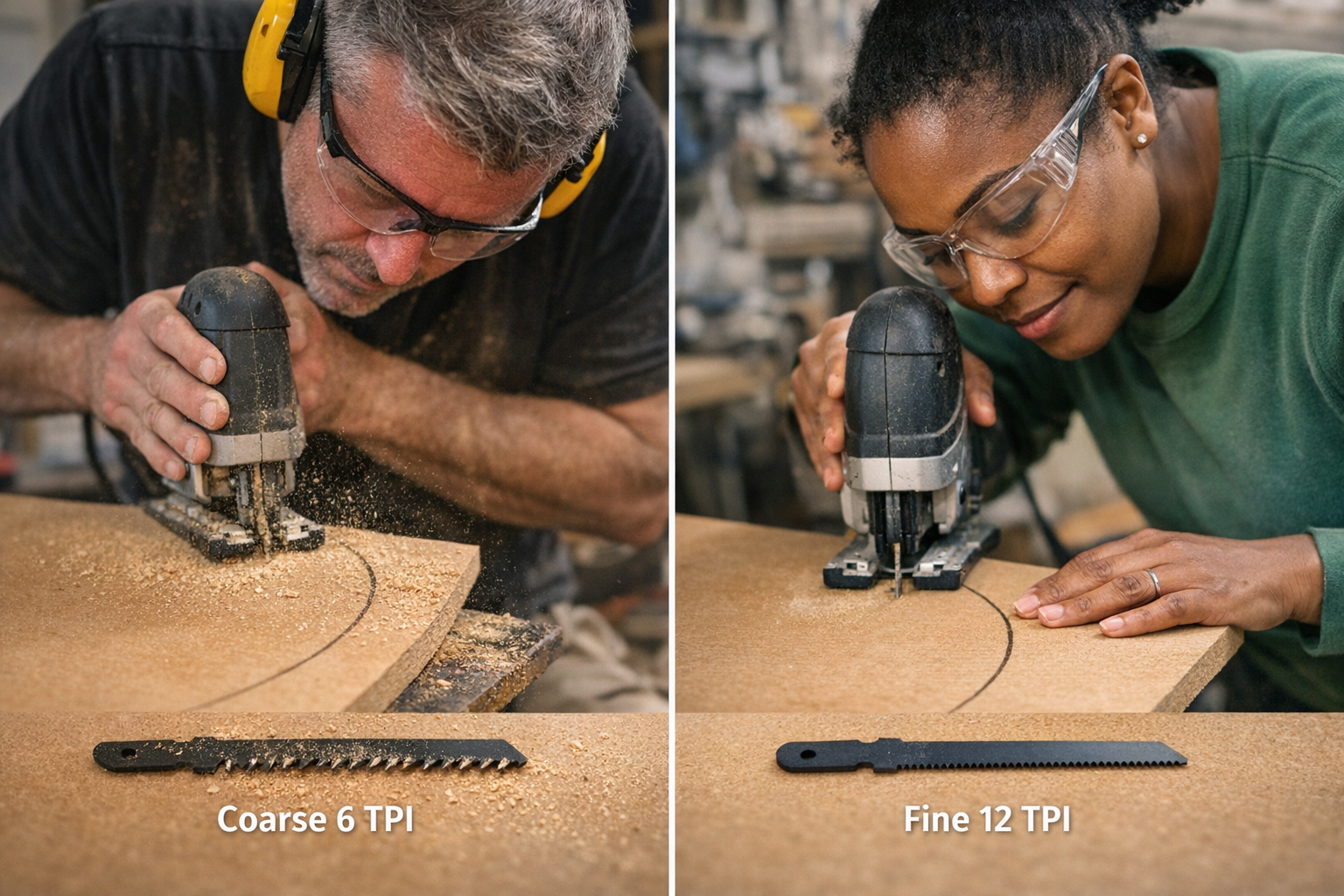
Nothing derails a cut—or a whole project—quite like a jigsaw blade that refuses to play along with your template. The first gentle sweep through birch ply feels promising, until the curve tightens. That’s when the blade stiffens, buzzes, and leaves a jagged track behind. Push harder, and you’ll see familiar signs: the blade bending outward, the saw motor sounding strained, and the “curve” quickly veering off your pencil line. If you’ve tried fitting panels or shelves with hand-cut arcs, you know this pain—wobbly edges, splintered veneer, and more time spent fixing than cutting.
When the Blade Fights Back: What Actually Happens Mid-Cut
Curves rarely look intimidating on paper. But in the real workshop, fitting a tight scribe for a cabinet or cutting a patch panel that needs to mate perfectly exposes just how unforgiving curved cuts can be. Most people pop in the standard jigsaw blade—the one fresh from the tool case—and assume it’s good enough. As the saw rounds the bend, though, you watch the line start to wander, no matter how steady your grip. Getting a clean, usable part feels less like carpentry and more like damage control.
On actual jobs, this drift means more than a scruffy edge. The piece won’t nestle into place. Joints are uncooperative, and you end up sanding and test-fitting, sometimes until the fit goes loose. The struggle isn’t about your skill—it’s almost always about the wrong blade working against you.
Curve Cuts Demand the Right Blade, Not Just “Any” Blade
What sabotages you halfway through a cut is the blade itself—specifically, its width and tooth design. The typical 6 TPI blade (the default in most kits) is wide, aggressive, and eager to blast through straight runs in pine or spruce. Slide that same blade around a 40mm inside radius in MDF or plywood, and resistance ramps up instantly. The blade bows, the kerf drifts wide, and chips tear out along the edge. Try to bull through multiple curved cuts and suddenly every part needs extensive sanding. Small pattern slips balloon into sanding marathons, driving up fatigue and frustration.
Swapping to a blade designed for curves—narrower, with 10–12 TPI—flips the script. Instead of wrestling for control, you watch the saw glide steadily around templates. The blade tracks predictably, and the dust comes off fine, not in chunks. When you compare both cuts, the curved-blade edge is ready for finish work with minimal touch-up. The time you claw back from sanding is real—and so is the drop in muscle fatigue.
Reality Check: Fitting a Panel Without the Guesswork
Picture yourself tracing out an S-curve on a shelf blank to clear pipes or baseboard. Run it with the kit blade: it bites hard, motor groans, splinters fan off both sides, and the fit is off by a mile. Slap on a 12 TPI, narrow profile blade for the rerun. Now the jigsaw hugs the template without skittering. The cut’s edge is smooth, the test fit just happens—no grinding, no filler, just a panel that drops in flush. One pass, one light sanding, done.
What Changes When the Blade Suits the Curve?
The difference turns up everywhere: how much control you feel, how steady the saw sounds, and how fresh your arms and wrists are by cut three or four. The right blade means it’s the tool—not your hands—handling the curve. You don’t have to muscle it around radii or course-correct constantly. The saw keeps a true line; you’re not compensating for flex or hoping a sander will rescue a rough corner later.
Across a project, these savings multiply. Fewer stop-and-sand breaks, fewer ruined parts, and way less physical strain. In a shop, those “little” moments add up. The right blade isn’t luxury—it’s how you keep small jobs from swelling into exhausting, error-prone slogs.
Spot the Warning Signs: When Your Blade Is Losing the Battle
Watch for these telltale signals that your blade isn’t cut out for the job:
- Escalating vibration as you round corners or switch grain direction.
- A fuzzy, torn edge forming mid-arc—especially noticeable in MDF or laminate.
- Visible saw marks or bottom-face blowout appearing right off the line.
- The cut line bulges away from your tape or pencil mark, denying even a careful guide.
These aren’t minor annoyances—they’re clues you’re losing time and risking a bad fit. Don’t accept a tool fighting you as “normal.” Swap blades before cleanup becomes the biggest task.
Field Your Questions: Curve Cutting Answers from Real Shop Time
How do I choose a jigsaw blade for tight curves?
Always look for narrow blades with a higher tooth count—ideally 10–12 TPI. These blades flex less in tight turns and deliver cleaner results, especially on radii under 50mm or on materials likely to chip. For broad, shallow curves or thick framing, sure, the standard blade can handle it. But for finish-level work or fragile faces, fine teeth and a slim profile win every time.
Why do my curves always tear out or finish rough?
Most often, it’s a coarse or wide blade grinding against the material rather than slicing through it. Plywood in particular hates aggressive blades—they rip fibers and leave ragged edges. Instead, slow your feed, let the blade do the work, and reduce saw speed. Don’t try to “overpower” a bad blade choice.
Does adjusting my jigsaw’s speed or orbital setting matter?
Definitely. Pairing a narrow, fine-toothed blade with slower saw speed and minimal orbital action produces the cleanest edges, especially around intricate templates. You get less chip-out in hardwoods and a silky finish in laminates. If clean curves matter, always try reducing both before blaming your skills.
Workshop Tips for Smoother, Easier Curve Cuts
- Follow the blade’s lead. Let your feed rate match the blade’s ability to turn—not the other way around.
- Keep one or two sharp curve-cut blades at the ready and swap instantly when resistance crops up.
- Double-mark important arcs—use pencil and masking tape—so you catch drift immediately, especially where a visible veneer edge matters.
You don’t need a drawer full of specialty blades. A basic set of curve blades, alongside the stock types, pays for itself in hours recovered and repairs avoided.
Recognize Blade Trouble Before the Mess Grows
It’s easy to stick with a blade that “sort of works,” especially mid-project. But the cost piles up—crooked lines, aching hands, endless sanding. Whenever your cut starts veering or the saw begins to chatter, that’s your cue: pause, switch blades, and let the tool carry its weight. Stepping back for a moment beats losing time—and materials—to a fixable problem.