
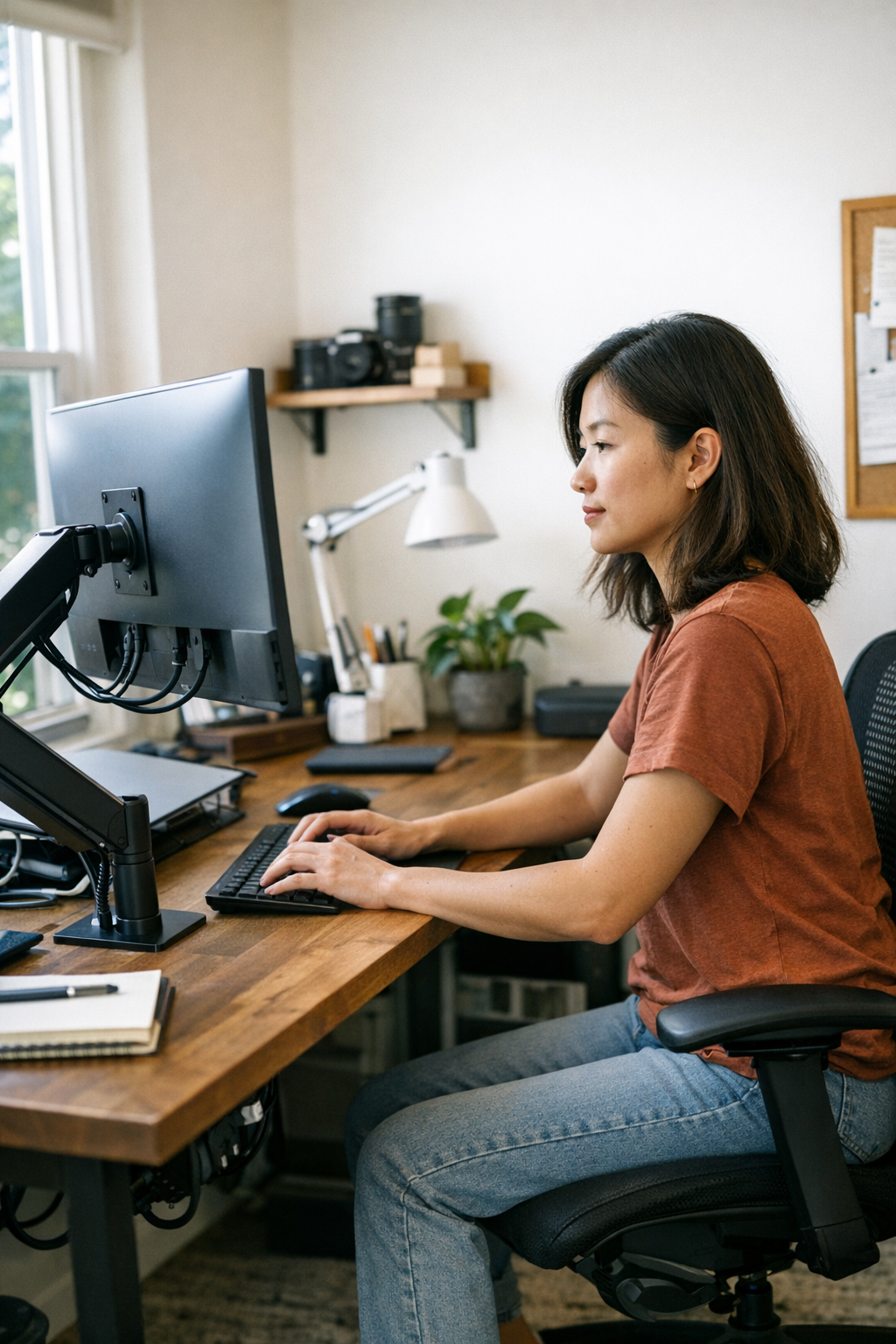
Most mornings, my desk would appear neat enough: a closed laptop from the night before, a notepad placed slightly to the side, and a monitor positioned directly in front of me. That monitor was almost impossible to overlook—it dictated the placement of my keyboard and influenced which hand I reached for my coffee mug with. It even pushed aside small items like a pen that had slipped beneath its edge. Over time, I began to notice an everyday resistance stemming from the monitor’s rigidity; it refused to move, occupying precious desk space and subtly shaping how I worked and how clutter accumulated.
The Subtle Strain of Fixed Desk Setups
My home workspace had gradually started to push back against me, mainly because the monitor’s fixed stand kept it anchored right between me and everything else I needed. This positioning locked my arms in place, forced me into a single viewing angle of the screen, and allowed harsh glare from the window to wash over important emails as the sun shifted throughout the day. Adjusting the monitor meant a cumbersome two-handed maneuver, often snagging cables and precariously dangling the power brick over the desk’s edge. That feeling of an uncomfortably close screen each morning made my workspace feel confined—something I had to work around rather than with.
Introducing Movement: The Impact of a Monitor Arm
At first, adding a monitor arm seemed unnecessary. However, the moment I set one up, the difference was immediate and remarkable. Elevating the screen freed up fundamental desk space: suddenly, there was room to move the keyboard, align my notebook more naturally, or just breathe without the monitor looming over me. Instead of a static, “one-size-fits-all” placement, I could angle the screen away from unwelcome glare or tilt it upward until reflections faded. The entire desk felt less boxed in and more welcoming.
This flexibility replaced the habitual desk shuffles I had become accustomed to—no more pushing sticky notes aside or engaging in a tug-of-war with my coffee mug to find a free spot. Most importantly, I could shift the monitor rather than awkwardly adjusting everything else around it. Some mornings, a simple pivot would let me catch softer light or nudge the screen so my wrist aligned better over the keyboard. On video calls, the ability to lift the monitor an inch or two meant I no longer needed to cringe at awkward camera angles that showed a disproportionate amount of ceiling or the top of my head.
Practical Tips for Optimizing Your Monitor Placement
- Adjust for glare: Position your monitor so that windows’ glare doesn’t hit the screen directly, reducing eye strain and improving visibility.
- Align with your line of sight: Ensure the top of the screen is at or just below eye level to promote good posture and reduce neck strain.
- Use a monitor arm or riser: Adding a monitor arm or riser can free up desk space and offer easier adjustment without disassembling cables.
Midday Reflections: The Small Changes that Add Up
By midday, those slight adjustments continued to pay off. The usual office sounds—keyboard clicking, calendar reminders, the whirring laptop fan—grew familiar, but reaching for my notebook was easier than ever. Shifting the monitor aside to clear space for handwriting notes or pulling it forward to focus on a detailed spreadsheet didn’t disrupt the flow, nor did it cause cables to dangle dangerously close to the desk edge.
Of course, there was the occasional moment when a cable snagged as I swiveled the monitor too far, serving as a reminder that some minor desk frustrations are inevitable. But these small inconveniences felt far less significant than the benefits gained. Overall, the desk’s adaptability reduced tension and made it feel as if it was working with me rather than against me.
Refreshing Your Workspace Perspective
One realization that came later in the day was that much of my daily desk clutter stemmed less from disorganization and more from challenges related to movement and reach. When your workspace adapts fluidly to your needs throughout the day, tension naturally eases. Sharpening this perspective can be revitalizing—declutter not just by removing objects, but by improving how the space accommodates your actions.
Refresh tip: Try changing your monitor’s position at least once during your workday to create a subtle shift in energy and focus. Small adjustments—even a slight tilt or shift to catch different lighting—can reinvigorate your work rhythm and prevent physical fatigue. Integrate movement into your routine by consciously repositioning your workspace every few hours to keep a fresh sense of engagement.
The Calm of Evening: Wrapping Up the Day
As evening descends, the changes in lighting and temperature shift the atmosphere around the desk. The sunlight angles differently, warming the edges of the desk mat while part of the screen catches a soft glow. Adjusting the monitor tilt is quick and almost automatic now, making the day’s close more seamless.
With the monitor raised on an arm, I find it easier to swing it out of the way to clear space for a notebook or even a cooling cup of tea. No longer do I have to clear the entire setup just to reclaim desk space. Instead, a gentle nudge of the monitor arm reveals items that once seemed lost beneath the fixed base and opens up the surface just when the pace slows.
By the time I finish up for the day—closing down tabs with a few keyboard taps—I swing the screen aside to create open space for tomorrow’s notes or personal projects. This simple routine makes transitioning from work to rest smoother, reinforcing the idea that a flexible workspace supports not just productivity but wellbeing.
Conclusion: Designing a Workspace that Works with You
The journey from a rigid, cluttered desk to an adaptive, spacious workspace doesn’t require a complete overhaul. Often, a small but thoughtful shift—like installing a monitor arm—can transform more than just your desk’s layout. It impacts how you sit, how you reach, when you take breaks, and even how you wind down after a long day.
Investing time in creating a desk setup that flexes with your needs encourages a healthier rhythm and eases the subtle friction everyday desk life frequently causes. By allowing movement rather than imposing fixed positions, your workspace becomes a partner that supports focus, comfort, and creativity throughout the workday and beyond.